How to Build & Deploy Conversational AI
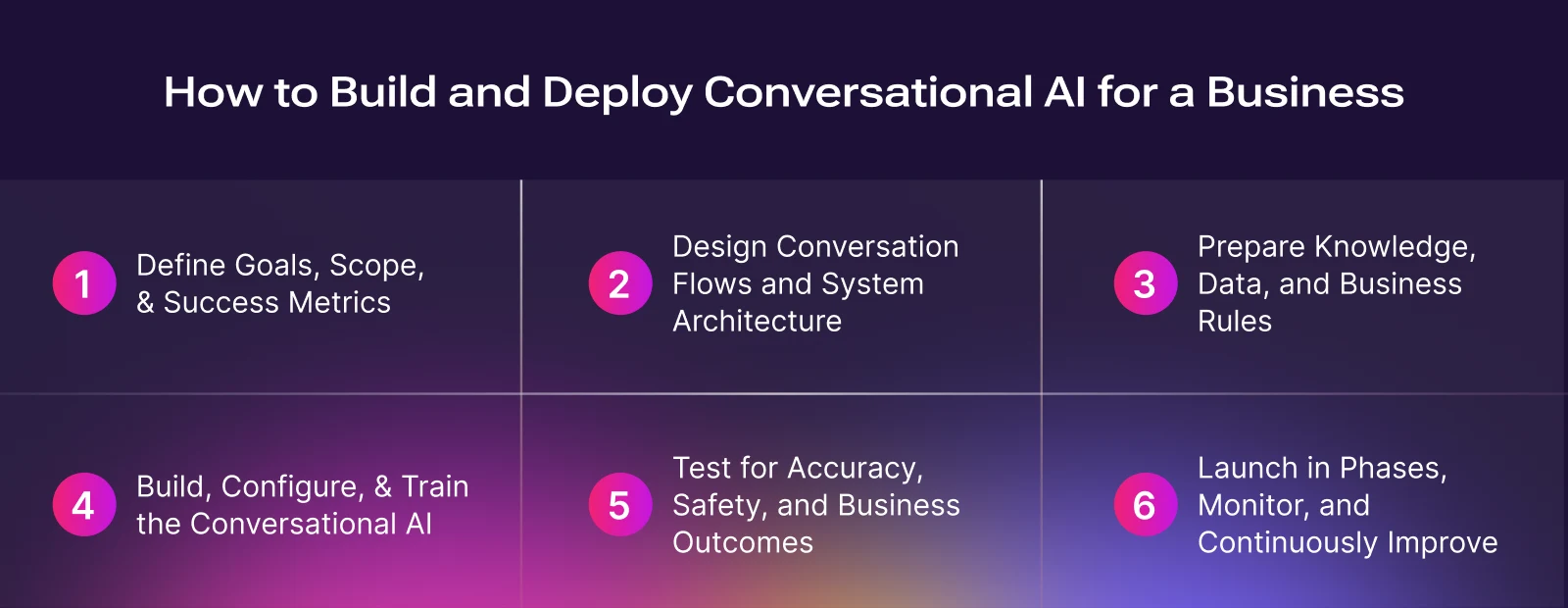
Outlines a six-step process businesses follow to build conversational AI, covering goal setting, conversation design, knowledge preparation, system development, testing, and phased deployment to ensure accuracy, safety, and measurable operational outcomes.
Building conversational AI for a business is not just about making a chatbot that can answer questions. In large organizations, conversational AI is rolled out in planned phases, across people, processes, and technology, with a strong focus on accuracy, safety, and measurable business outcomes.
Businesses typically use conversational AI in areas such as customer support (answering FAQs, tracking orders), sales and marketing (qualifying leads, helping users choose plans), internal operations (HR or IT helpdesks), and industry-specific use cases like healthcare scheduling or banking inquiries. Each of these has different risks, rules, and technical needs. For example, an e-commerce company may use chatbots for order tracking and returns, while a bank may restrict its bot to balance checks and card controls due to regulatory requirements.
Following is a practical 6-step guide that reflects how conversational AI is actually built and deployed in modern businesses.
Step 1: Define Goals, Scope, and Success Metrics
Before writing any code or choosing tools, the first step is to clearly define why you are building conversational AI and what problem it should solve.
Instead of trying to automate everything at once, successful teams start with narrow, repeatable, high-volume tasks. Examples include “Where is my order?”, “Reset my password”, or “Book an appointment.” These questions are common, follow clear rules, and are easy to measure.
At this stage, teams also define:
- Success metrics such as resolution rate, containment rate, response time, customer satisfaction (CSAT), or revenue impact.
- Guardrails, meaning situations where the AI must hand off to a human agent, such as complaints, compliance-related queries, or high-value customers.
Example
A telecom company may start with a goal like “Resolve 60% of billing-related questions without human agents within three months,” while routing cancellation requests directly to live support.
This step usually involves business teams, operations, and engineering working together, ensuring the AI supports real business goals rather than acting as a standalone experiment.
Step 2: Design Conversation Flows and System Architecture
Once the goals are clear, the next step is to design how the AI will interact with users and how conversational AI works behind the scenes.
On the user side, this includes designing conversation flows i.e. what happens when a user asks a question, how the AI responds, and what options are shown next. These flows should be simple and predictable, similar to following a clear path in a well-designed app.
Example
If a user asks, “Where is my order?”, the AI may first ask for an order ID, then fetch the status, and finally offer next steps like “Track shipment” or “Talk to support.”
On the technical side, teams design the architecture, which often includes:
- A language model (LLM or NLU engine)
- Channels such as website chat, mobile apps, WhatsApp, email, or voice/IVR
- Integrations with backend systems like CRMs, order databases, billing systems, or identity systems
- Hosting decisions, such as cloud-based platforms or private deployments for regulated industries
For voice-based AI, most businesses use a cascaded setup that combines several components of conversational AI: speech-to-text (ASR), followed by the LLM model, and then text-to-speech (TTS).
Example
A call-center voice bot converts a customer’s spoken question into text, checks order status using backend APIs, and reads the result aloud in a natural voice.
Many teams create a small prototype or proof of concept at this stage to validate the design before building the full system.
Step 3: Prepare Knowledge, Data, and Business Rules
Conversational AI learns and responds based on the information it is given. In businesses, this is less about raw training data and more about accurate knowledge and clear rules.
Teams collect existing materials such as:
- FAQs and help center articles
- Policy documents and product guides
- Internal standard operating procedures (SOPs) used by human agents
This information is cleaned, updated, and structured so the AI can reliably use it.
Example
A returns policy that spans multiple documents is rewritten into a clear step-by-step flow the AI can follow without guessing.
Critical processes such as refunds, authentication, or compliance-related answers are identified as “golden flows” and handled with extra care.
Rather than letting the AI guess answers, modern systems use retrieval-based approaches, where the AI looks up relevant information from approved documents before responding.
When a customer asks about refund eligibility, the AI retrieves the exact policy section instead of generating a generic response that would result in what is called “golden flows”.
Step 4: Build, Configure, and Train the Conversational AI
With goals, design, and knowledge in place, the AI can now be built.
Teams may choose different approaches depending on complexity:
- No-code or low-code platforms for simple workflows
- Pre-trained models accessed through APIs for faster deployment
- Custom frameworks for advanced control and deep integrations
Most teams start by building a Minimum Viable Product (MVP).
Example
An MVP for a travel company might only handle booking confirmations and flight status before expanding to cancellations and upgrades.
At this stage, teams also:
- Configure prompts and system instructions to guide tone and behavior
- Define structured workflows instead of relying on one large prompt
- Set up tool usage so the AI can fetch order details, update records, or trigger actions safely.
Step 5: Test for Accuracy, Safety, and Business Outcomes
Before launching, the AI must be tested thoroughly. This goes beyond checking if answers are correct. Teams design test scenarios using realistic personas and goals.
Example
A tester pretends to be an angry customer demanding a refund after the return window has closed, checking whether the AI follows policy and escalates correctly.
Automated tools simulate conversations to see whether the AI:
- Solves the task successfully
- Follows business rules and policies
- Uses the correct tone and avoids risky responses
- Escalates to humans when required
Regression testing is also introduced. After updating refund rules, teams rerun old test conversations to ensure unrelated flows, like order tracking, still work correctly.
Step 6: Launch in Phases, Monitor, and Continuously Improve
Launching conversational AI is not a one-time event. Most businesses roll it out in phases:
- Internal testing with employees
- Limited release to a small percentage of users
- Gradual expansion across channels, regions, or customer segments
Example
A retailer may first deploy the bot only on its website chat before adding WhatsApp and voice support.
Once live, the AI is continuously monitored. Teams track:
- Resolution and escalation rates
- Customer satisfaction and feedback
- Cost and response latency
- Failure patterns such as missing knowledge or broken integrations
- Safety and compliance incidents
If many conversations fail at the same step, teams review transcripts, update knowledge, or fix integrations in the next iteration cycle. Building conversational AI for a business is like onboarding a new team member at scale. You define its role, train it with approved knowledge, give it clear rules, test it carefully, and supervise its performance continuously.
When done correctly, conversational AI becomes a dependable business tool that results in handling routine work efficiently, supporting customers consistently, and freeing human teams to focus on complex, high-value tasks.
Our 24/7 Conversational AI Agents
Banking
Conversational AI in banking that handles account servicing, payments, and lending queries in real time...
Sales
Reduce friction, speed resolution, and scale 24/7 sales experiences. Run full workflows through...
Contact Center
Round the clock support with a human touch. Run full workflows through conversational ai technology...
Marketing
AI-powered conversational AI marketing chatbots and agents to deliver a more personalized customer experience...
Logistics
Streamlines logistics and supply chain operations with real time tracking, cost savings, multilingual support, and...
Education
Personalized learning, faster outcomes, higher engagement, scalable support, and measurable academic performance gains.
Finance
Improves efficiency, reduces costs, enhances CX, ensures compliance, and scales personalized...
Government
Transform government services through automation, improve efficiency, accessibility, citizen satisfaction, and...
BPO
Boosts BPO efficiency, scalability, and CX while reducing costs, improving resolution rates, and enhancing agent productivity.
Manufacturing
Boosts OEE, reduces MTTR, automates workflows, enhances productivity, and delivers real-time insights across...
Games
Drives retention, immersion, automation, and monetization through scalable, real-time, personalized player interactions...
Airlines
Reduces costs, accelerates support, boosts satisfaction, enables 24/7 multilingual service, along with...
Plumbers
Helps capture leads, automate bookings, reduce no-shows, improve response times, and increase overall efficiency.
Media
Boosts engagement, drives revenue, automates workflows, and delivers personalized, scalable audience...
Dealerships
Turn calls into booked appointments and qualified leads - delivering higher coverage, less workload, and...
Insurance
Conversational AI in insurance automates claims intake, personalizes policy support, and...
E-commerce
Automate order status, returns, and FAQs with natural-sounding AI voice agents. Faster answers...
Customer Support
Conversational AI for customer support handles queries across chat, voice, and messaging - 24/7, in natural language...
Telecom
Answer every call instantly, resolve billing and network issues, cut handle time, and turn interactions into advantages
Hotels
Boosts bookings, guest satisfaction, efficiency, personalization, multilingual support, and operational performance...
HR & Recruiting
Answer PTO and leave, benefits and payroll questions, policy FAQs, onboarding check-ins, employee...


