Free AI Video & Audio Dubbing: Localize Videos in 40+ Languages
Instantly dub your video and audio files into 40+ Languages with Murf AI. Get started now with 100 free minutes of high quality AI voice dub.

AI Dubbing Like Never Before
Localize content in 28+ languages and get human-like voices, emotional tone and accurate lip-syncing.

30x Faster than Traditional Dubbing
Murf AI speeds up video dubbing. It automates translation, lip sync, and voice cloning. The work finishes in one day instead of weeks. Creators and filmmakers can reach global audiences fast.

Instant Access to Global Reach
AI dub your content into 40+ native languages, including US English and US Spanish, to reach both local and international markets. Scale content for marketing, education, YouTube videos, and business environments with seamless voice quality.

Exact Duration, Seamless Sync
Eliminate the need for timeline adjustments or manual syncing and deliver a seamless viewing experience with accurately synced dialogue. Export dubbed videos in MP4 format, optimized for playback on YouTube, TikTok, and Instagram without any compromise in quality.

High Translation Accuracy
Murf's AI dubbing technology delivers context-aware translation, preserving tone and cultural meaning in every language. It avoids any mistranslations, lost meanings, or grammatically incorrect phrases in your communications, ensuring a more accurate voice dub every time.

Expert Linguistic Review
Get your dubbed AI content reviewed by native speakers from our expert network, ensuring every word and phrase is spot-on and authentic. Also, an additional layer of review from professional linguists and ensure that every phrase, idiom, and inflection is conveyed authentically.

Hyper Accurate Lip-Sync (Coming Soon)
Advanced audio dubbing that syncs mouth movements with audio in real-time - perfect for movies, interviews, product demos, and US broadcast projects.
Discover the ease and speed of professional dubbing with Murf AI

English- American
.webp)
English

Spanish

French

Italian
.webp)
Spanish (Mexico)

German

Hindi

Portuguese (Brazil)

Chinese (Mandarin)

Korean

Japanese
AI Dubbing Use Cases
Empower your content to cross borders effortlessly - AI dubbing provides efficient, accurate, and scalable voice adaptation for diverse business needs. Here are some of them:

Filmmaking & TV
Cut post-production costs by automating dubbing, voice synthesis workflows for multilingual films and series.

Educational content
Make lessons and tutorials accessible by dubbing in multiple languages.

Marketing & Promos
Create multilingual ads optimized for platforms like TikTok & Instagram to boost engagement cost-effectively.

Content Creation
Expand your global reach by dubbing videos for YouTube, podcasts, reviews, and documentaries with natural AI dubbing that cuts translation and production costs.

Employee onboarding training
Scale onboarding videos globally with consistent AI voice dubbing across multiple languages.

Product Demos
Create multilingual product demos that engage customers beyond borders using Murf’s video AI dubbing tool.
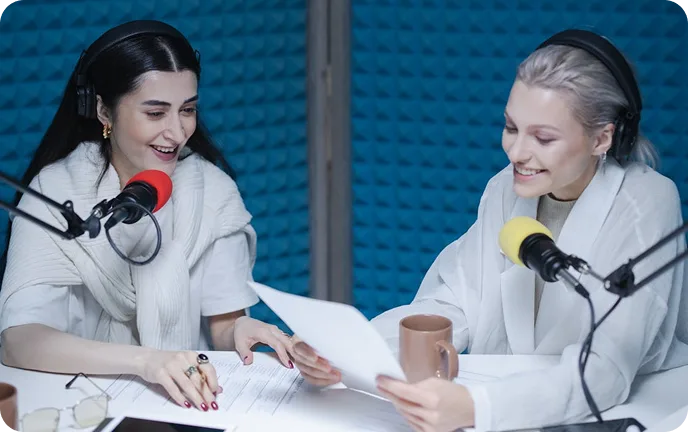
Podcast Episodes
Translate your podcast episodes into multiple languages to expand reach across global streaming platforms.
How to Dub Video & Audio with Murf AI?
Whether you’re working on enhancing the AI dubbing or audio dubbing workflow, Murf keeps the entire process streamlined and automated.

Upload Media Files
Log in to Murf Dub, create your first project and upload your audio/video file (drag-and-drop or browse).

Select Target Language
Choose the languages you want to dub the file into and select Automated Dubbing (Select up to 40 languages)
.webp)
Dub, Review & Export
Once the file is dubbed, review and export in your preferred format. Download the translated transcription
along with your dubbed output file.

Higher Dubbing Quality, Backed by Benchmark Results
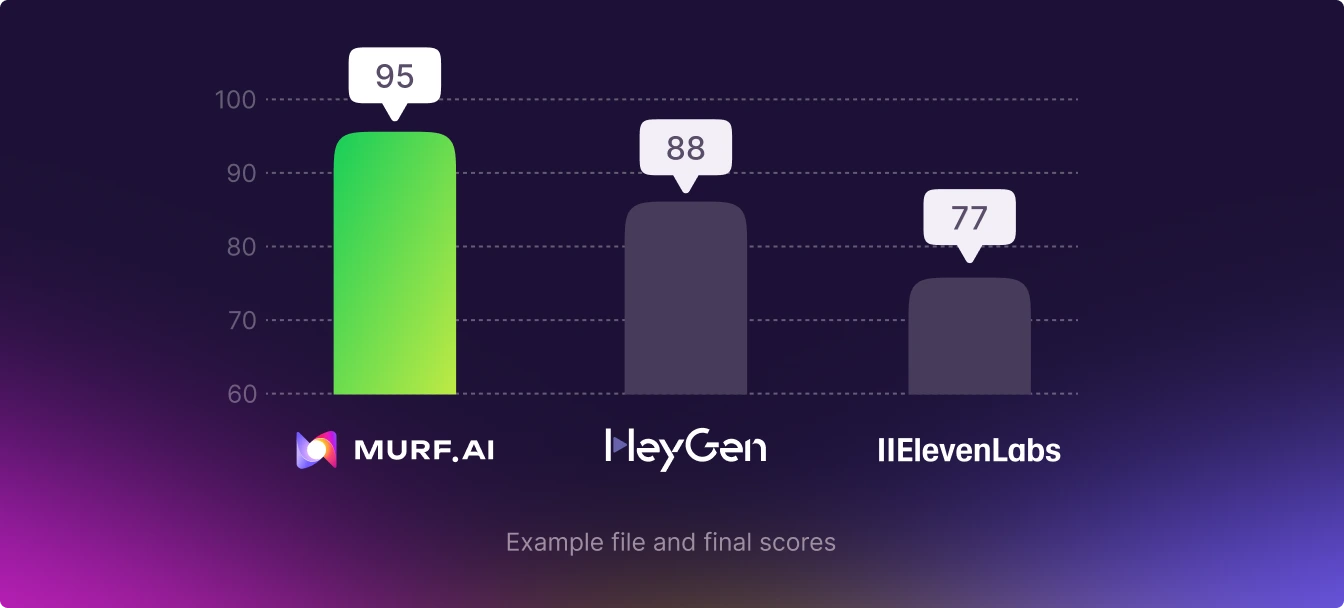
In benchmark comparisons, Murf consistently scores higher on AI dubbing quality than other popular platforms. Murf’s context-aware translation pipeline cuts down on errors, such as mistranslations, omissions, and tone mismatches. This results in more natural, publish-ready dubbed content across languages.
Stay Ahead with Murf’s Advanced Dubbing Tool
Automated Dubbing
Generate natural, translated voices while maintaining emotion, clarity, and professional-grade audio quality throughout your workflow.
Auto Language Detection
Murf detects the original language instantly, so you can start high-quality AI dubbing without manual setup.
Multiple Language Dubbing
Convert your source video into different languages at once with Murf’s AI video dubber. Each output maintains a consistent tone and delivery.
Dubbing at Scale with Murf AI
Use Murf’s API to dub large volumes of audio content - perfect for apps, games, streaming platforms, and enterprise workflows.
Authentic AI Voice Cloning
Clone the speaker’s voice and recreate it in multiple languages. Murf’s cloning system replicates tone and delivery while adapting speech for each region.
Consistency Without the Hassle
Maintain uniform pronunciation and brand tone without requiring voice actors. No reshoots or delays - just consistent AI-powered voiceovers.
What is AI Dubbing?
AI dubbing is the process of translating video or audio dialogues using artificial intelligence. Unlike traditional methods, it understands the original speech, translates the script, and creates new dialogue in another language while keeping the original speaker’s voice, emotion, and timing intact. This automation reduces the time and cost of localization, making it easier for content creators, educators, filmmakers, advertisers, and marketers, especially in the United States, to produce multilingual content with authentic U.S. English voice quality. As a result, AI dubbing helps businesses and creators quickly reach a global audience with faster and more affordable content localization.
Built for Scale. Benchmarked for Excellence

Scale high-quality AI dubbing across projects without production bottlenecks.
Murf delivers industry-leading dubbing quality proven through competitive benchmarking.
Turn videos multilingual at scale with 200+ natural-sounding AI voices.
Murf’s AI Dubbing is better than Traditional Dubbing
Voice Generation
Requires studios, voice actors,
lengthy revisions that can
take weeks
Generates translated synced voice
tracks in hours
Model Accuracy & Consistency
High-accuracy possible, consistency
may vary
Consistent accuracy and tone using
trained models
Cost Efficiency
Expensive - typically can cost $75-
$100 per minute + external fees
100 minutes of free dubbing after
sign up
Editing Flexibility
Editing content post dubbing requires
additional costs and time.
Translation edits done instantly
without any re-recording
Language Scalability
Based on availability of voice talent
Dub in 40+ languages instantly
More than just a Dubbing tool
Manage and scale every aspect of video production with our AI dubbing studio and API.
.webp)
Dubbing Studio
Expand your audio and video reach globally at a fraction of traditional dubbing time and cost. Dub multiple audio/video files into 40+ languages simultaneously in our Dubbing studio. Sign up now to dub 100 minutes of content for absolutely free.

Dubbing API
Professionally dub your audio and video content in 40+ languages while preserving the authentic feel of the original. Our Dubbing API delivers high-quality localized voiceovers at an unparalleled scale.
Trusted by over 300 leading Forbes 2000 Enterprises


.svg)
Hear from Our Customers

Murf makes TTS voiceovers time/cost-efficient and fun
Murf was a game-changer for me. Not only was Murf able to cut costs for hiring voice over artists for my business, but the quality was outstanding. I love the fact that I simply press buttons and in a matter of minutes I have a clear and very human-like voice overs done!
Anja S
Technical Training Manager\Enterprise(> 1000 emp.)
.webp)
Best text to speech service
Murf it's an amazing text-to-speech AI voice generator, easy to work with, flexible and reliable. Its voices, non-pro and pro (either English, Spanish, and French), are both so real that many clients of mine have been surprised to know that they were not from professional voice-over actors.
Xavier C
Digital learning specialist Enterprise(> 1000 emp.)
.webp)
Exceptional Quality and User-Friendly Experience
I recently tried murf.ai and I have to say I am thoroughly impressed. The quality of the generated voice is exceptional and very realistic, which is important for my business needs. The platform is user-friendly and easy to navigate, and the range of voices available is impressive.
Anunay R
Small-Business (50 or fewer emp.)
.webp)
Easy to use and affordable
This website is so easy and clear that you will find yourself mastering all the tools in no time. The fact that regenerating the voice with different voices, punctuations, and tones does not deduct from your allowed minutes is so fair and reasonable. And the price is affordable too. Highly recommended
Amirhossein H.
Small-Business(50 or fewer emp.)
.webp)
The most natural voice there’s a variety of voice
This is the most human-like voice I was able to find. It's very lively,and I found it suitable for many types of videos including marketing and e-learning, it kept my audience engaged!
Hani B.
Independent E-Learning Author and Management Coach Small-Business(50 or fewer emp.)
.webp)
My go to tool for audio and video
I just started to create a video channel about historical figures, and Murf.ai really brings them to life. I found my top voice for my scripts, and the easy integration of video elements makes it a breeze to create informative videos. I also like the easy changes one can make to the tone of voice from within the editor.
Philippe B.
Crisis & Emergency Risk Communications (CERC) Consultant Small-Business(50 or fewer emp.)

.webp)


FAQs
For any further questions,
send us a message at support@murf.ai

Upload your video, choose the target language, and let the AI process it. The platform translates, syncs, and replaces the Original Language audio automatically. Exported AI dub content is ready to use for Films, marketing, or Real-Time content delivery.
Yes. Murf Dub lets you dub up to 100 minutes of audio or video for free, making video dubbing online free accessible for beginners and professionals.
It depends on the file length, but Murf’s AI dubbing is up to 30x faster than traditional studios. You get synced results quickly, even for long Audio Track or video content.
Murf Dub is one of the best options for AI Video Dubbing, offering accurate translations, lip-sync, and fast processing - ideal for Content Creators, educators, and Audio Content publishers.
Murf supports MP4, MOV, AVI, MKV, MP3, WAV, AAC, and more. You can upload, translate, and export without compatibility issues using video dubbing online free workflows.
Yes. Murf lets you record or upload your voice and apply ai voice dub to generate multilingual versions. The AI keeps your tone, style, and delivery intact, helping you reach global audiences without re-recording.
Translation converts text or speech into a Different Language. Dubbing goes further by replacing the audio using translated script plus lip-syncing. It transforms the Original Language audio into a localized version that feels native and polished.
Often yes. Dubbing allows viewers to enjoy content in their Native Language without reading text, making the experience more immersive. Subtitles are quicker to produce but distract from visuals. For storytelling and long videos, video dubbing enhances viewer retention.
Dubbing replaces the Audio Track in a new Different Language, often synced with lip movements for a natural effect. Voice-over simply layers narration on top of the existing audio. If you want more immersion, Ai Video Dubbing is the better option; voice-over is faster but less engaging.
Yes. Murf Dub follows strong security standards and encrypted workflows to keep your data safe. Its ethical AI ensures accurate localization without altering the speaker’s intent, tone, or Original Language meaning.
Yes. Murf Dub supports multiple US English accents and voice profiles, helping Content Creators match authentic American tones. You can pick natural-sounding voices tailored for marketing, Films, and video localization.
Upload your video, choose the language you want, and let Murf’s Video Dub AI handle the rest. It creates a natural-sounding dub quickly, with no complicated setup required.
View more questions


