How to Start a Podcast on YouTube: Complete Setup & Tips Guide



Why should you learn how to start a podcast on YouTube? First of all, YouTube has 2.7 billion monthly active users, making it a premier platform for podcasters. It offers massive discoverability and provides options for both video and audio content.
The platform now features dedicated podcast sections in YouTube Studio and the YouTube Music app, making it easier for creators to reach vast global audiences. You can launch either a video podcast with full visual content or convert audio podcast episodes into YouTube-friendly formats.
This guide walks you through every step, defining your format and niche, setting up your YouTube channel, choosing equipment, recording and editing episodes, optimizing for search, and growing your audience.
Whether you're starting fresh or bringing an existing podcast to YouTube, this workflow helps you succeed on the platform.
Step-by-Step: How to Launch Your Podcast on YouTube
This step-by-step guide breaks down the process into actionable tasks. Following these steps helps you avoid common mistakes and build a successful podcast from the start. Each phase addresses critical elements that impact your podcast's reach and performance.
Step 1: Define Your Podcast Format, Niche, and Audience
Start by identifying your podcast format and theme. Decide whether you'll create interview-style conversations, solo commentary, storytelling, or panel discussions. Your podcast content should address specific interests or solve problems for your target audience.
Choose a niche where you have expertise or passion, as this authenticity attracts dedicated listeners. Plan episode length based on your format - interviews often run 45-60 minutes, while solo episodes may work better at 20-30 minutes. Determine publishing frequency (weekly, biweekly, or monthly) and commit to consistency.
Define your tone: educational, entertaining, inspirational, or conversational. Research similar YouTube podcasts in your niche to understand what works and identify gaps you can fill. Clear planning at this stage helps you create focused podcast content that resonates with viewers.
Step 2: Set Up Your YouTube Channel
Create or log in to your YouTube account to begin. Set up your channel with a memorable podcast name that reflects your niche and is easy to search. Add professional channel artwork, including a profile picture and banner that visually represent your podcast show.
Navigate to YouTube Studio and access the "Content" tab. Click on "Podcasts" in the left sidebar, then select "New podcast" to create your podcast container. Fill in the podcast details, including title, description, and category.
You can also set an existing playlist as a podcast if you have already uploaded podcast videos. This dedicated podcast section helps with discoverability on both YouTube and the YouTube Music app.
Your channel setup establishes your brand identity and makes it easier for new audiences to find your content.
Step 3: Prepare Recording Setup (Audio Only or Video + Audio)
Your recording setup depends on whether you're creating a video podcast or an audio podcast. For video podcasts, you need a camera (DSLR, mirrorless, or webcam), adequate lighting (ring light or natural light), a clean background, and video editing software.
Position your camera at eye level for professional-looking podcast videos. For audio-only podcasts, invest in a quality microphone (USB microphone like Samson Q2U or Rode PodMic), find a quiet room with minimal background noise, and use audio recording software like Audacity or GarageBand.
Audio-only creators must convert their recordings into video format by adding a static image, waveform visualization, or slides before uploading to YouTube. Even basic equipment works if you prioritize audio quality and steady lighting. Start with what you have and upgrade gradually as your podcast grows.
Step 4: Record Your First Episode
Focus on capturing good audio quality regardless of your setup. Position your microphone correctly - typically 4-6 inches from your mouth at a slight angle to reduce plosives. Check audio levels before recording to avoid distortion or overly quiet sound.
For video podcasts, ensure proper lighting hits your face evenly and check that your camera framing looks professional. Test your setup by recording a brief sample and reviewing both audio and video quality. Speak clearly and maintain consistent energy throughout the episode.
Don't worry about perfection in your first few episodes - you'll improve with practice. Record extra material at the beginning and end to give yourself editing flexibility. Save backup copies of your recordings immediately to prevent data loss.
Step 5: Edit, Export, and Upload Episode
Edit your recording using editing software to remove mistakes, long pauses, and filler words. Add intros and outros that include your podcast title and a summary of the episode theme.
For audio podcasts, create a video file by pairing your audio with a static image, animated waveform, or slideshow. Clean up background noise and balance audio levels for consistent listening. Export in YouTube-friendly formats like MP4 or convert audio into a video format.
Upload through YouTube Studio and immediately add videos to your podcast playlist or podcast section. Include chapter markers and timestamps in your description to improve the viewer experience. Add links to resources mentioned in the episode and include calls-to-action.
Properly organizing podcast episodes within your podcast container helps with discoverability.
Step 6: Optimize and Publish: Metadata, Thumbnails, Descriptions, SEO
Create eye-catching square podcast thumbnails that clearly show your podcast logo and episode theme. Your podcast title should be descriptive and include relevant keywords that help people discover your content.
Write detailed descriptions with timestamps, episode summaries, and all the details viewers need. Add relevant tags related to your niche and topics covered. Include a summary at the start of your description for viewers browsing YouTube.
Set appropriate visibility settings - you can schedule podcast videos to publish at optimal times. Add your episode to the correct podcast playlist to maintain organization. Use YouTube Studio features like end screens and cards to promote other podcast episodes.
Optimizing these podcast details significantly impacts how new audiences find your content through search and recommendations.
Step 7: Promote, Engage, and Build Audience
Share new episodes across social media platforms like Instagram, Twitter, and LinkedIn. Create short clips or highlights from full-length episodes and post them as YouTube Shorts to attract new viewers. Respond to comments promptly to build community and encourage repeat viewers.
Use YouTube's community tab to post updates, polls, and behind-the-scenes content between episodes. Cross-promote on other social media platforms with teaser clips and episode announcements. Invite guests who can share your podcast with their own audiences.
Collaborate with other podcasters in your niche for mutual growth. Encourage viewers to subscribe and turn on notifications for new episodes. Repurpose podcast content into blog posts, social media posts, or email newsletters to maximize reach.
If you’re exploring additional distribution platforms alongside YouTube, it’s also worth understanding how creators monetize on emerging video platforms. For a broader perspective, see our guide on how to make money on Rumble.
Step 8: Analyze Performance and Iterate
Use YouTube Analytics and podcast analytics to track your podcast's performance. Monitor key metrics like views, watch time, average view duration, and audience retention rates. Identify which podcast episodes perform best and understand why they resonate with viewers.
Check traffic sources to see whether viewers find you through search, browse features, or external links. Review demographic data to confirm you're reaching your target audience. Pay attention to the audience's preferences by noting which topics, guests, or formats generate the most engagement.
Use these insights to refine your podcast content strategy. Test different podcast title styles, thumbnail designs, and episode lengths based on performance data. Track your YouTube views growth over time to measure progress.
Regular analysis helps you improve continuously and grow your podcast systematically.
Two Paths to Podcasting on YouTube: Video Podcast vs. Audio Podcast
You have two fundamental approaches when creating a podcast on YouTube. Video podcasts show hosts on camera, while audio podcasts convert audio content into a video format with minimal visuals.
Each format appeals to different creators and target audience preferences. Your choice depends on production capacity, content style, and viewer expectations.
Video Podcast (Camera + Video Format)
.webp)
Video podcasts feature hosts and guests on camera, showcasing facial expressions and body language. This format achieves higher viewer retention and engagement because visual elements keep audiences interested longer.
You need proper lighting, cameras, clean backgrounds, and video editing software, making production more demanding than audio-only formats. Editing takes longer since you manage both audio and video quality simultaneously.
Video podcasts perform exceptionally well on YouTube because the platform prioritizes watch time, and viewers naturally gravitate toward video content. This format suits creators comfortable on camera and want to build stronger personal connections with their audience.
Audio Podcast + Visual Essentials
Audio-only podcasts focus on sound quality while converting recordings into video-compatible files for YouTube upload. Pair your audio content with a static image (podcast logo or episode artwork), animated waveform, slideshow, or minimal visuals. Many creators use this method to repurpose existing podcasts from platforms like Apple Podcasts, making it a smart way to expand reach without re-recording.
This approach offers a lower barrier to entry. You don't need cameras, lighting equipment, or complex video editing software - just a quality microphone and audio recording tools. The editing process focuses solely on audio quality, cleaning up sound, removing mistakes, and adding intros or outros. Solo creators or those transitioning from audio-only platforms find this method significantly easier to manage.
Audio-focused podcasts work well for storytelling, educational content, deep-dive discussions, or any format where visuals aren't essential. The simplified production lets you publish podcast episodes more frequently and consistently.
While you might see slightly lower retention compared to video podcasts, audio-first content still reaches vast global audiences on YouTube and performs well in the YouTube Music app.
Tools, Gear, and Budget: What You Need to Start (From Minimal to Pro Setup)
Your podcasting equipment needs depend on your budget and goals.
- Beginner setup ($50-$150): Start with a simple microphone like the Samson Q2U, basic headphones, and free editing software like Audacity or GarageBand. Add your smartphone camera if creating a video podcast.
- Intermediate setup ($300-$700): Upgrade to XLR microphones (Rode PodMic, Shure SM58), an audio interface (Focusrite Scarlett), quality headphones, ring lights for video, and paid editing software like Adobe Audition.
- Professional setup ($1,000+): Invest in premium XLR mics (Shure SM7B), multi-channel mixers, DSLR cameras, softbox lighting, boom arms, acoustic treatment, and advanced video editing software.
You can start a podcast with minimal investment and upgrade as your audience grows.
Expand Your Podcast Globally Using Murf AI Dubbing
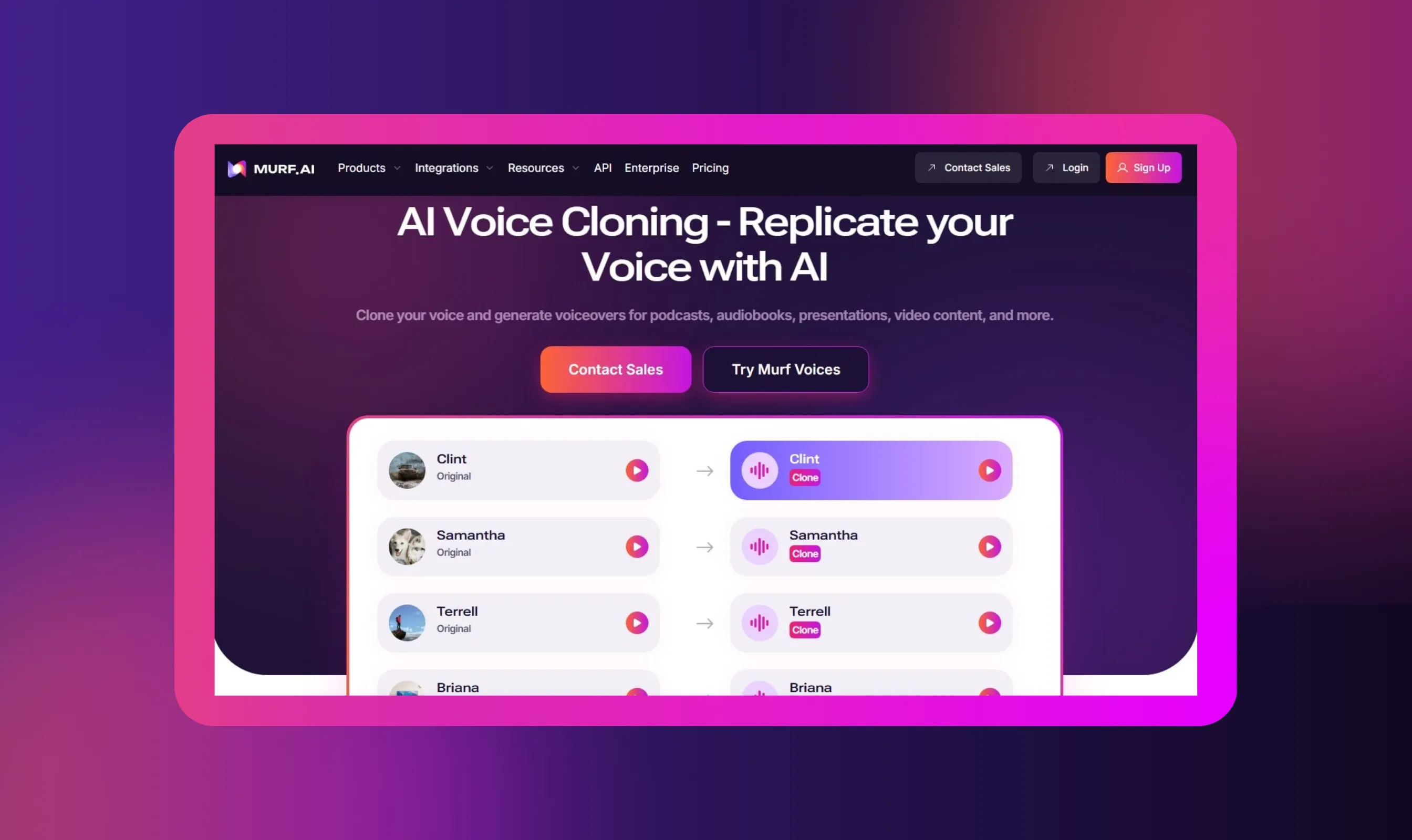
Murf is a voice tool that unlocks the power of AI to help you clone your voice, translate into international languages, and even turn your text into speech within minutes.
Murf's voice dubbing tool helps you translate podcast episodes into 40+ languages without re-recording. The platform's voice translator and video translator features automatically dub your podcast content while preserving your original tone, emotion, and delivery.
Convert full-length episodes or create multilingual YouTube Shorts to reach vast global audiences. Murf's AI voice cloning replicates your speaking style across different languages, maintaining an authentic delivery that sounds natural to international listeners.
The technology works 30x faster than traditional dubbing, letting you scale your podcast on YouTube without hiring voice actors for each language. This helps podcasters tap into YouTube's global platform and grow audiences in non-English-speaking countries.
Use Murf AI to break language barriers and efficiently expand your podcast's reach.
Conclusion
Learning how to start a podcast on YouTube requires choosing between video podcast and audio podcast formats, setting up your channel in YouTube Studio, defining your niche, and selecting appropriate podcasting equipment.
Success comes from consistency in publishing new episodes, maintaining good audio quality, and optimizing podcast details for discoverability. Use YouTube Analytics and podcast analytics to track performance and refine your approach based on audience feedback.
Promote your podcast content across social media platforms and create clips to attract new audiences. Start a podcast today with whatever equipment you have, then improve gradually as you learn what resonates with your target audience.
Your podcast on YouTube can reach millions when you combine quality content with strategic promotion.


Frequently Asked Questions
Is it better to start as a video podcast or audio-first?
.svg)
Choose video podcasts if you're comfortable on camera and want higher engagement. Pick audio podcasts if you prefer simpler production, lower costs, and faster publishing. Video typically performs better on YouTube, but audio-first works well for solo creators with limited equipment.
What equipment or investment do I need to start a YouTube podcast?
Minimum investment: $50-$150 for a USB microphone, headphones, and free editing software. For video podcasts, add a camera and basic lighting. You can start with your smartphone and upgrade gradually as your podcast grows.
Can I use my existing podcast (audio) and publish on YouTube too?
Yes, absolutely. Upload your audio podcast to YouTube Studio by converting it to video format with a static image or waveform. You can also submit your RSS feed directly to YouTube Studio to automatically publish new episodes.
What are the advantages and disadvantages of YouTube-hosted podcasts vs. traditional podcast platforms?
- Advantages: YouTube offers vast global audiences, better discoverability, monetization options, and YouTube Analytics.
- Disadvantages: Requires a video format, faces more competition, and lacks some dedicated podcast features found on Apple Podcasts. YouTube complements rather than replaces traditional platforms.
Is it worth putting your podcast on YouTube?
Yes, YouTube provides access to over 2.7 billion users and superior discoverability compared to audio-only platforms. The platform offers multiple monetization options, detailed podcast analytics, and integration with YouTube Music. Most successful podcasters now distribute on both YouTube and traditional platforms.
Do YouTube podcasts make money?
Yes, through multiple revenue streams. Once you reach 1,000 subscribers and 4,000 watch hours, you qualify for ad revenue, YouTube Premium earnings, and channel memberships. Additional income comes from sponsorships, affiliate marketing, and Super Chats during live streams.
How much does it cost to start a podcast on YouTube?
You can start for free using your smartphone, free editing software, and existing equipment. Budget setups cost $50-$150 for a quality microphone. Intermediate setups run $300-$700, while professional studios cost $1,000+, depending on video quality requirements.
.webp)

.webp)


.webp)

.webp)