How to Dub YouTube Videos: A Step-by-Step Guide



Key Takeaways
- YouTube’s massive global audience makes dubbing a powerful strategy to expand reach, improve watch time, and unlock international growth without creating new videos from scratch.
- Dubbing is especially valuable for news, education, entertainment, travel, science, and awareness-focused channels that serve globally relevant topics.
- Automatic dubbing on YouTube offers a fast, AI-driven way to add multilingual audio, but creators must review outputs and align languages with audience demographics.
- However, it has limitations, including translation inaccuracies, synthetic voice quality, limited language coverage, and a lack of brand voice control.
- For greater precision, creators can manually upload or replace multi-language audio tracks directly through YouTube Studio.
- Professional AI dubbing tools like Murf address quality gaps by offering realistic voices, word-level editing, voice cloning, and better audio-video synchronization.
YouTube entertains and educates a major chunk of the world's population, with over 900 million viewers from India, the United States, and Indonesia alone.
This reach creates a major opportunity for creators willing to adapt their content. By dubbing YouTube videos into multiple languages, creators can attract more viewers by breaking any language barrier.
Dubbing also helps creators expand channel visibility and improve watch time. Viewers are more likely to stay engaged when content feels familiar and accessible. Dubbed videos often perform better in international search results, supporting stronger discoverability.
For businesses and educators, dubbing builds trust and credibility in new markets. It also allows creators and dubbing studios to reuse existing content efficiently without producing videos from scratch.
Beyond reach, dubbing supports monetization and long-term growth. More accessible content attracts diverse subscribers and increases ad revenue potential. It also strengthens brand consistency across regions while maintaining a single content strategy.
In this article, let’s look at various methods to change a YouTube video's audio, starting with the platform's default, recently added AI-powered translation feature.
How Automatic Dubbing Works on YouTube
Automatic dubbing on YouTube uses AI to translate spoken audio and generate new language tracks without requiring voice actors or video editing. The system combines speech recognition, machine translation, and text-to-speech technology.
To enable and customize automatic dubbing, creators typically follow these steps:
- Open YouTube Studio from a desktop browser.
- Go to Settings and select Upload defaults.
- Navigate to Advanced settings and enable Automatic dubbing.
- Choose whether to auto-publish dubs or review them before publishing.
- Upload a new video and allow YouTube to detect the original language.
- Open the video’s Languages tab to view generated audio tracks.
- Preview each dubbed version for accuracy and tone.
- Publish, unpublish, or delete specific language tracks as needed.
Once enabled, automatic dubbing applies to future uploads by default. Creators retain full control over which languages appear on their videos, such as Spanish and Portuguese.
This is where YouTubers need to check the demographic data to ensure they offer their content in the right foreign language.
Applications of YouTube Video Dubbing
YouTube dubbing can potentially emerge as a game-changer for creators across sectors. Here are the different types of YouTube videos where dubbing can be beneficial:
News and Current Affairs
We live in an interconnected world, and any significant event occurring in any part of the world holds relevance for the global population. In such a scenario, dubbing can benefit news and current affairs-related videos. It helps make the content accessible to non-native speakers.
For instance, the English videos on the Israel-Palestine crisis with the right analysis are equally relevant for people from Indonesia, the Middle East, and Europe, making it easier to connect with and comprehend the situation.
Educational Channels
Businesses, creators, and universities can make their content more inclusive by dubbing YouTube educational videos. Most concepts and content on educational channels are cut across geographies, and by offering explanations or translations in the target language, channels can cross the language barriers and boost reach and popularity among the global audience. For example, a video on ‘how to communicate effectively’ can be dubbed in multiple languages with a voice actor using YouTube video dubbing to provide a better impact on the global society.
Comedy and Entertainment Channels
Comedy and entertainment channels can use YouTube dubbing by changing the original language of their sketches, making them more relatable to the audience. With the right cultural nuances and changes, dubbing in various languages can make comedy and entertainment content relevant for global users rather than just a small group of users.
Travel Vloggers
Travel vloggers can use the dubbing function on YouTube to create voiceovers and descriptions in more languages, allowing them to reach a wider audience for the same destinations or adventures. By using an AI voice generator, vloggers can efficiently produce high-quality voiceovers in different languages, providing complete control and saving time while expanding their global reach.
Environmental and Science Channels
Content created by environmental and scientific channels can use the dubbing feature to increase awareness about environmental issues globally. In fact, by creating content in multiple languages, these channels can gain support for their dubbed content and cause more effectively.
Limitations of YouTube Automatic Dubbing
While automatic dubbing helps creators scale faster, it comes with several practical limitations to consider:
- Inconsistent translation accuracy: Generic AI localization may miss context, idioms, or cultural nuance from the translated script, reducing message clarity.
- Synthetic voice quality: Generated voices can sound unnatural, affecting emotional delivery and viewer engagement.
- Limited language support: Automatic dubbing is available only for select languages, restricting full global coverage.
- No tone or style control: Creators cannot customize voice personality, pacing, or emphasis to match brand identity.
- Errors in technical or niche content: Industry terms, names, and acronyms are often mispronounced or mistranslated.
- Review required for quality assurance: Creators must manually check dubs of other languages, adding operational overhead and slowing workflows.
- Not available to all creators: Feature access may depend on account eligibility or regional rollout stages.
Creators looking to deliver a more engaging experience to any particular audience can consider manually adding audio tracks in their viewers' preferred language. Let's look at how to do that.
Benefits of YouTube Dubbing
YouTube Dubbing helps improve the accessibility of the content and adds the required personal touch. Here are some additional key benefits:
Cultural Relevance
With the use of YouTube Dubbing, creators can increase the cultural relevance of their content. This relevance not only helps generate more views but comes in handy in the journey to achieve better engagement among the audience.
Professional Audio
AI dubbing in various languages is powered by artificial intelligence, the output is professional. This helps improve the overall quality of the video. With the video's audio, creators can increase the appeal of their content and work towards establishing a presence in other international markets.
Global Reach
YouTube dubbing has the potential to increase a creator’s global reach. As creators upload content in multiple languages, it helps to build a global audience in the long run. With global reach, the overall impact and stature in the industry can also be expected to receive a boost in the long run.
Regulatory Compliance
Dubbing on YouTube can be useful in maintaining industry-specific regulations or compliance. By following the dubbing option on YouTube Studio, creators can ensure they are on the right side of the law in matching such requirements.
Enhanced Accessibility
Dubbing on YouTube is particularly useful in making the content accessible to a broader audience, including people with learning, visual, and reading disabilities. They can use it to listen to the dubbed videos in the language of their choice. This makes YouTube’s dubbing feature not only good for the creators but also for society at large.
Adding Multi-Language Audio to Your YouTube Videos
There is more than one way to go about the YouTube dubbing process. Here are the two primary methods that you can consider for adding multi-language audio to your content:
Method 1: Upload Multi-Language Audio Tracks
This method can be used to upload multi-language audio tracks to your existing content.
Step 1: Sign in to YouTube Studio from your computer and click ‘Subtitles’ from the left menu.
Step 2: Click on the video that you want to edit.
Step 3: Click ‘Add Language’ and select the language from the list.
Step 4: Click ‘Add’ under ‘Audio.’
Step 5: Click ‘Select File’ and choose which file you want to upload to the video. It is important to note that the selected file needs to be in audio-only format and should be the same length as the video.
Step 6: Click ‘Publish’ when satisfied with the output.
Note: Creators will need to record the subbed audio tracks before uploading, as this method does not support automatic voice dub.
Method 2: Replacing Previously Uploaded Audio Files
This method is used in cases where a multi-language audio track has been uploaded, and you want to replace it with a new one.
Step 1: Sign in to YouTube Studio on your computer.
Step 2: Click on ‘Subtitles’ from the left menu.
Step 3: Click on the video that you would like to edit.
Step 4: Under ‘Audio,’ click the ‘delete’ option for the selected language.
Step 5: Repeat the steps in Method 1 to upload the fresh audio track for the selected language.
Note: It is suggested that subtitles and captions be added and the video titles and descriptions translated before uploading the final content. This will help to increase the reach and visibility.
Murf: Generate Polished Audio for YouTube Dubbing
Murf is an AI voice and dubbing platform built for professional-grade audio production at scale. It goes beyond basic text-to-speech by offering end-to-end video dubbing with strong control over voice quality, timing, and delivery.
For YouTubers, this means localized audio that sounds intentional, not automated, just like in the primary language.
The platform's dubbing capabilities focus on realism and control. It supports 40+ languages and accents, with a large library of human-like voices trained for clarity and natural pacing. It also allows YouTubers to clone their voice ethically to retain consistency.
Creators can fine-tune pitch, speed, emphasis, and pauses to match on-screen visuals.
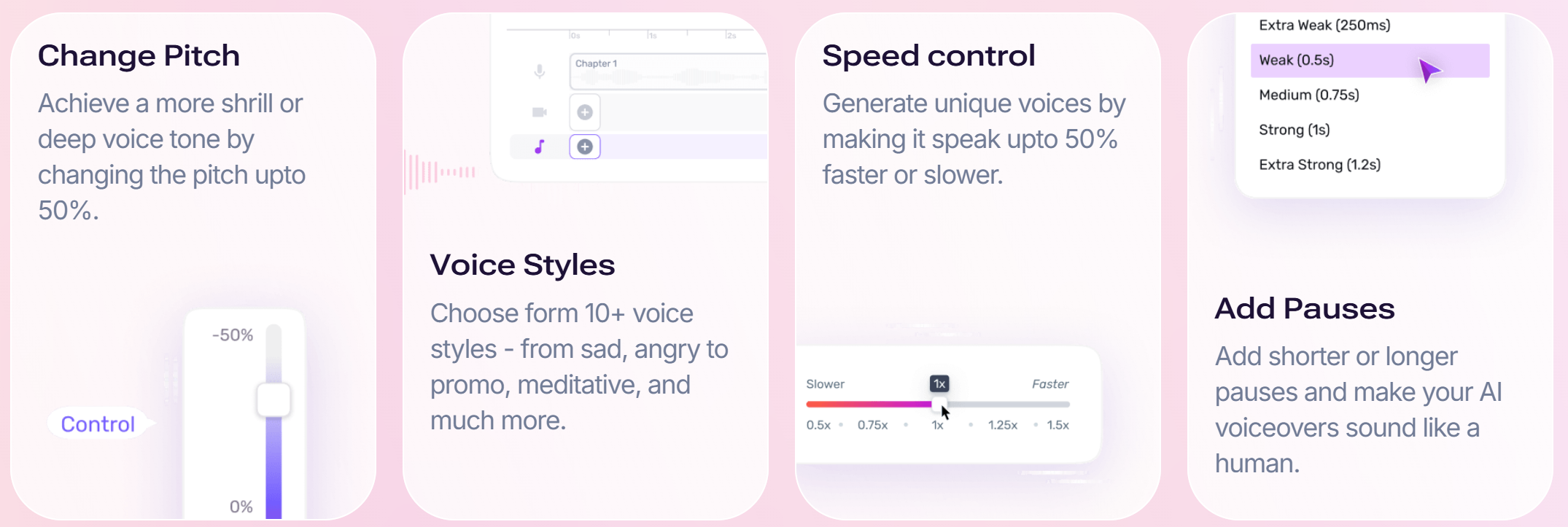
Murf also provides word-level editing, allowing precise corrections for names, technical terms, and brand phrases. Its scene-based editor helps align dubbed audio with video timing, reducing lip-sync issues with the original video.
For production teams, Murf includes collaboration features, version control, and reusable voice styles.
Getting started with Murf is simple and creator-friendly:
- Create a Murf account and open the AI Dubbing workspace.
- Upload your YouTube video or original audio file.
- Select source and target languages for dubbing.
- Choose a voice and customize tone, speed, and emphasis.
- Edit the script at the word level for accuracy and timing.
- Export the final dubbed audio or video for YouTube upload.
Ready to dub videos professionally for your YouTube channel?
Sign up for Murf today and get 100 free AI dubbing minutes.


Frequently Asked Questions
What equipment do I need to dub a YouTube video?
.svg)
You would typically need a good-quality microphone along with audio editing software. It is also ideal to have a quiet recording space so that the audio quality is professional.
Can I dub a video that’s already on YouTube?
Yes. You can replace the audio of the videos you created on YouTube and upload the new audio track with the help of a YouTube video editor. The process for doing that is pretty simple and can be found within YouTube Studio.
What is video dubbing on YouTube?
Video dubbing on YouTube involves replacing the original audio track of a video with a new one, often in a different language or for creative purposes. Video dubbing helps to add more variety to the content and makes it more relevant to a broader audience.
Why would I want to dub a YouTube video?
Dubbing can help you reach a wider audience that may otherwise not be aware of the impact of your content. Dubbing is also helpful in improving video accessibility and adding a personal touch to your content to create an impact on the international audience.
How Much Effort Goes into Dubbing YouTube Videos?
Dubbing effort depends on the approach used. YouTube's Automatic Dubbing requires minimal setup but still needs review for accuracy. Traditional human dubbing demands the most time, coordination, and budget. The best approach is to leverage professional-grade video dubbing tools like Murf to ensure the highest quality standards while maintaining operational efficiency.
.webp)

.webp)