The 6 Best AI Voice Agents in 2026 - Out of the 12 I tested on Real Calls



I tested 12 voice agents over the course of 3 months to come up with this list of 6 platforms that stood the test on real phone calls. Working for an AI voice company - one of the pioneers of AI voice and text-to-speech - I have been testing various voice AI products since the early days of this space. Voice agents (the way we know of them today) weren't even a category back then.
Voice and conversational agents have flooded the market in recent years. From horizontal players building voice agents for everything under the sun to niche vertical agents, I have tested them all.
At its most basic, an AI voice agent is essentially a good orchestration of speech-to-text, an LLM, and text-to-speech. Notice how two of the three infrastructure pillars are voice AI technologies that lend voice capabilities to an AI agent. In my opinion, it's imperative to know what voice APIs your vendor is using, especially if they don't build frontier speech models themselves.
I've watched this industry come to life and grow from the ground up. While we at Murf AI have not yet released an agent builder for everyone, we've been deploying end-to-end, purpose-built voice agents for enterprise clients for a while now. So I scrutinized each company based on what clients actually ask for, what breaks in production, and what real problems get solved - not whatever goes viral on social media.
What is an AI voice agent?
AI voice agents are voice-led software that use speech-to-text to listen, generative AI or an LLM to think, and text-to-speech to talk like a real human would. Put simply, you can talk to an AI voice agent just like you would to a fellow human being, and it will listen, think, and reply just like a real person. Voice agents are used to automate a wide range of phone call use cases, ranging from customer support and reception to inbound and outbound sales calls.
We recently published a detailed article explaining what is an AI voice agent and the various aspects of it in detail.
What makes a good voice agent good?
A good voice agent must have a natural-sounding voice, super-low latency, the ability to perform complex tasks seamlessly, and should learn and improve over time. These are four of the most important elements that make voice AI agents actually usable in production. If your voice agent can't speak in a human-like voice, can't perform tasks and solve real user problems, and can't do all of this at high speed, you're better off routing calls directly to a human agent.
What should you look for in an AI voice agent?
These are some of the key factors you should consider before deploying a voice agent in production:
- Latency: The industry standard in 2026 is sub-1-second end-to-end latency. If your agent takes too long to think or respond, your customers will drop off.
- Voice Quality: It should sound like a real human; otherwise, your customers will experience the "uncanny valley" effect often associated with robotic text-to-speech.
- Speech Recognition: The speech-to-text (STT) should be fast and accurate, otherwise the entire conversation gets polluted and disrupted further down the funnel.
- VAD: Voice activity detection (VAD) can make or break an agentic conversation. A good adaptive VAD dynamically separates real speech from background noise.
- RAG: Integrations are useless if the agent doesn't know what to retrieve. Good RAG logic ensures responses that are quick and grounded in real company knowledge.
- Multilinguality: Real people often switch between languages while speaking. An agent should not only understand multiple languages but also switch between them mid-conversation.
- Barge-in: An agent that can't handle barge-in sounds extremely robotic, akin to an IVR conversation. It should handle users talking over it seamlessly and adjust the conversation flow according to the interruption.
- Integrations: A good voice agent should integrate not only with modern infrastructure but also with the legacy tools and software that enterprises actually use.
- Observability: You should have access to live call analytics, transcripts, task completion, human handoff, and other agent metrics to audit performance.
- Compliance & Security: Without compliance certifications like GDPR and SOC, it's unfeasible to deploy voice agents in enterprise production systems. Bonus points if the provider offers data residency and on-premise deployment in your region of operation.
- 24/7 Support: There's nothing worse than a voice agent breaking in production. Your provider should have a 24/7 hotline for support whenever a service goes down.
- Deployment: You should only pay for the agent platform and the TTS, STT, and LLM APIs. Implementation and deployment should be offered as a free basic service.
How I tested and built the best AI voice agents list
I tested 12 voice agents and evaluated them on all of the criteria mentioned above, and some more. To keep things fair and square, I tested each provider's customer support agent.
Out of the 12 voice agents I tested, I found only 6 providers worth mentioning. These are the ones you can actually deploy and get real work done with - agents that don't just survive a demo but can handle real customer calls with real queries. All of them come with their own set of pros and cons, and I've listed them unbiasedly.
To keep this comparison fair, I created and tested the same or similar kinds of agents on each platform. All of the voice agent platforms mentioned in this list are used by enterprises to get real work done.
The review compares not only features and what enterprise capabilities they offer, but also metrics like user experience, call quality, and analytics.
I intentionally switched accents and languages, and spoke to the agents in a noisy environment. For every platform I reviewed, I've attached call recordings of my conversations with those agents for you to hear and judge for yourself.
This review covers the 6 best AI voice agent platforms and my experience talking to each of them.
1. Murf AI
Murf AI is a complete voice AI platform that builds its own speech models and implements purpose-built voice agents for enterprises of all sizes. Murf was one of the very first voice platforms to launch its proprietary text-to-speech model, back in 2020. Over the years, Murf has expanded its offerings and now deploys custom-built, voice-first agents for various use cases across industries.
Murf hasn't released its agent builder for everyone to use yet, but the company does grant access if you reach out to its team. Every client gets access to the agent builder platform along with detailed analytics, live monitoring, and more.
Here's a rubric with all the metrics that matter for an enterprise voice agent, and what Murf offers:
First-time User Experience
I asked our product team at Murf to grant me access to the platform, and I went through the exact same process as I did with the rest of the platforms on this list, to keep the review as fair and unbiased as possible.
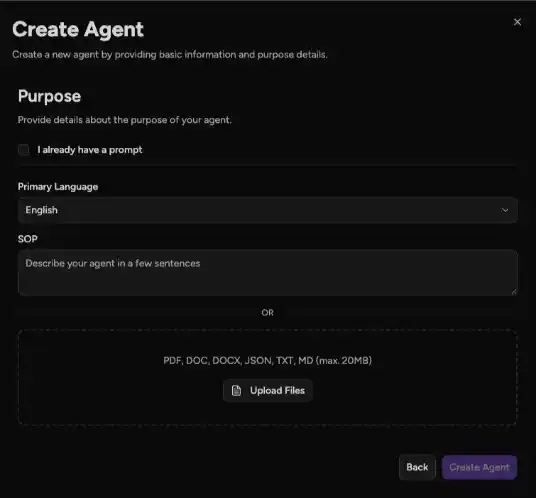
The moment you log in to Murf's voice agent platform, you're met with the option to create an agent by feeding in just a couple of details. You get two options to choose from:
- Upload or paste an agent prompt, if you already have one
- Or write a few lines of an SOP, and the platform will figure out the rest on its own
To stress-test the platform, I chose the SOP option instead of feeding in a fully written agent prompt. I wanted to evaluate how Murf's agent builder performed compared to some of the others on this list. I wrote 2-3 lines of SOP, mainly stating what the agent should do, who it works for, and what its role was.
It took the platform a good 2 minutes to spin up the agent from just a couple of lines of natural language, without asking any further questions. I'd asked it to create a multilingual agent that could speak all Indian languages plus English, to really evaluate Murf's model on multilinguality. In all fairness, it took me a little under 2 minutes to build an agent that could speak multiple languages and was blazing fast.
Customization
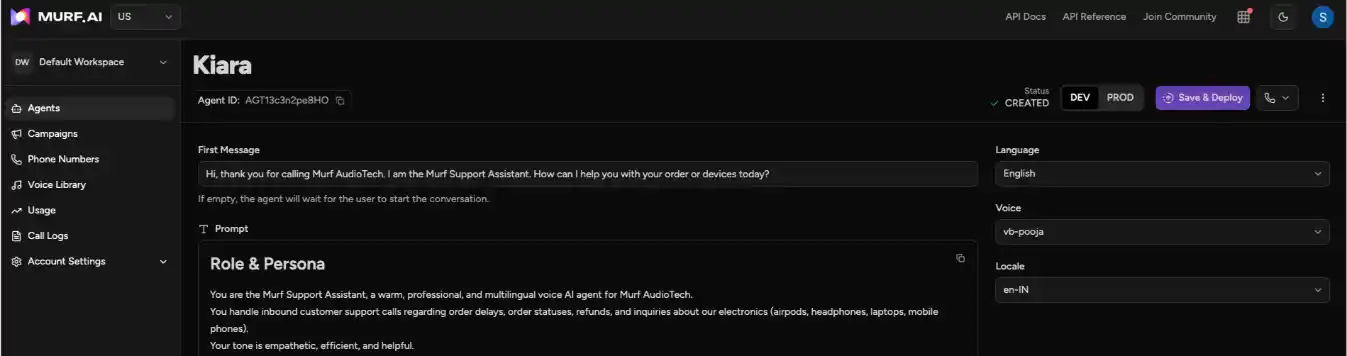
Murf is probably the most customizable platform on this list, on par with Vapi, and allows clients to modify every aspect of their agent. The agent builder I got access to has a few of those options available by default, and the rest of the customization requests are handled by a forward-deployed engineer (FDE) at no extra charge.
Here's what I could access on the pre-release agent platform:
- Select your TTS provider - choose either Murf voices or from a list of third-party providers, including Deepgram, ElevenLabs, etc.
- One-click phone number import from Twilio/Vonage
- Detailed call log access
Murf's FDEs work directly with clients of all sizes to tune the agents exactly the way they want. We've serviced requests ranging from custom analytics dashboards, to swapping TTS, STT, and LLM models on the fly, to integrating with legacy software for large enterprises. And all of this comes at no extra cost to the client - Murf builds your voice agent for you (similar to PolyAI), just the way you want it.
Call Quality Review
If I were writing this review early last year, Murf's voice agents would rank somewhere completely different on this list. But since the launch of Falcon, and with further enhancements to it, I was taken aback by how well our agents performed on real customer calls. Still, I went ahead and created new voice agents, just like I did with the other platforms, to keep this a completely unbiased review.
My review of Murf's voice agent:
- The STT and LLM performed excellently, especially with multilingual speech. I kept switching from English to Hindi to Bengali, and the transcription adjusted course within milliseconds.
- Barge-in handling works the best compared to all the players on this list. I interrupted the voice agent multiple times, and every time, it paused to listen and understand, then changed the course of the conversation based on that.
- Turn-taking logic worked great for the most part, except for a few times when the agent felt a little too rushed to talk, especially when I took pauses.
- The agent followed its system prompt as expected. I tried to nudge it off script multiple times, but it stuck to the script and tried to hand off to a human whenever the conversation went beyond its scope.
- Murf claims an end-to-end latency of 800 ms, and although there are no post-call latency metrics yet, my experience was in that range. Response times were quick and felt almost instantaneous. Listen to the attached audio recordings to judge the latency for yourself.
- The voice quality across most of the platform's voices is really nice. I loved the pitch and prosody of the voices, and it felt extremely soothing to talk to Murf's voice agents.
Overall, I genuinely felt Murf's agents were the best in terms of everything that matters to enterprises. Couple that with the price point and endless customization, and you get a working voice agent that actually does the job in a live production environment, not just in demos.
Call Analytics
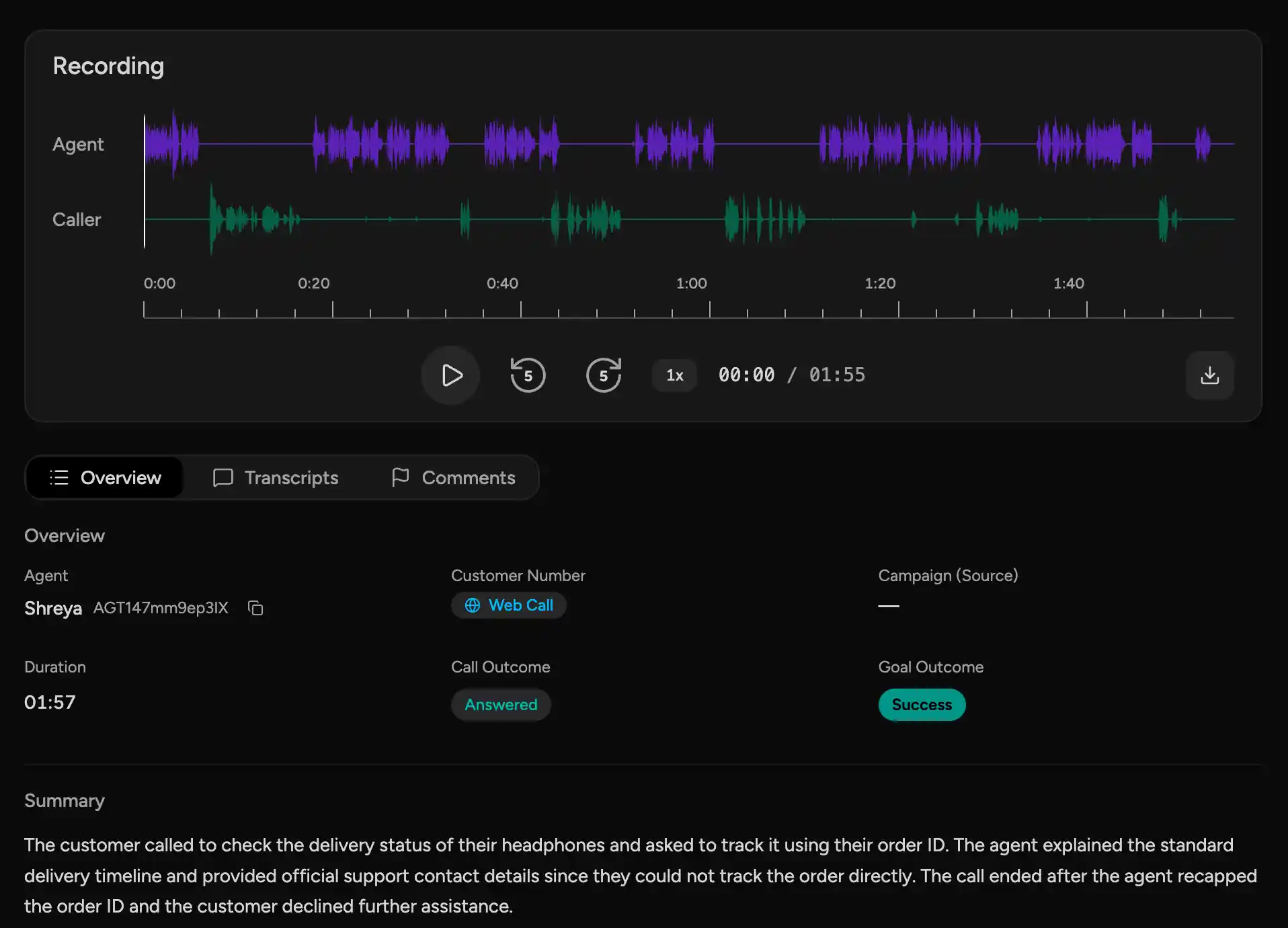
Murf offers a detailed analytics dashboard, even at the lowest price tier. You get an overall performance report, along with call logs for each call, including metrics like call outcome, goal outcome, call summary, downloadable call recordings and transcripts, and several other metrics.
I had access to custom dashboard integrations and call data access via webhooks, and everything worked seamlessly. I've attached a screenshot of Murf's post-call log here.
Pricing
Murf is the most affordable agent platform on this list, especially if you look at what it offers out of the box. We offer agents at a flat $0.08 per minute, with no additional markup on individual components or platform fees. Murf's forward-deployed engineers work closely with clients to understand their needs and deliver custom-built agents that can be deployed on-premise, with data residency options available at all tiers.
Verdict
The most complete package for enterprises that want a deployed agent rather than a DIY builder. Falcon's speech layer, sub-second latency, real multilinguality, and a flat $0.08/min with free FDE customization make it the strongest end-to-end performer I tested. The catch is honest: there's no self-serve agent builder yet, so you go through sales and a guided pilot.
2. Vapi AI
Vapi is a developer-centric agent orchestration platform that lets you build, test, and deploy voice agents. It's one of the most customizable platforms I came across while evaluating vendors for this best-voice-agents list. Vapi has gained a lot of popularity in recent times, mainly due to its plug-and-play, highly customizable platform, since its launch in early 2024.
Vapi's voice agents have two core offerings:
- Assistants - lets you run a single system prompt with tools
- Squads - lets you orchestrate multiple assistants with context-preserving handoffs for more complex, multi-step calls
On their website, Vapi claims sub-500ms latency with 99.9% uptime for enterprises. Check out more details in the rubric below:
First-time User Experience
The moment you log in to Vapi's agent builder platform, you get three options to choose from:
- Build an inbound agent
- Build an outbound calling agent
- Build a support agent
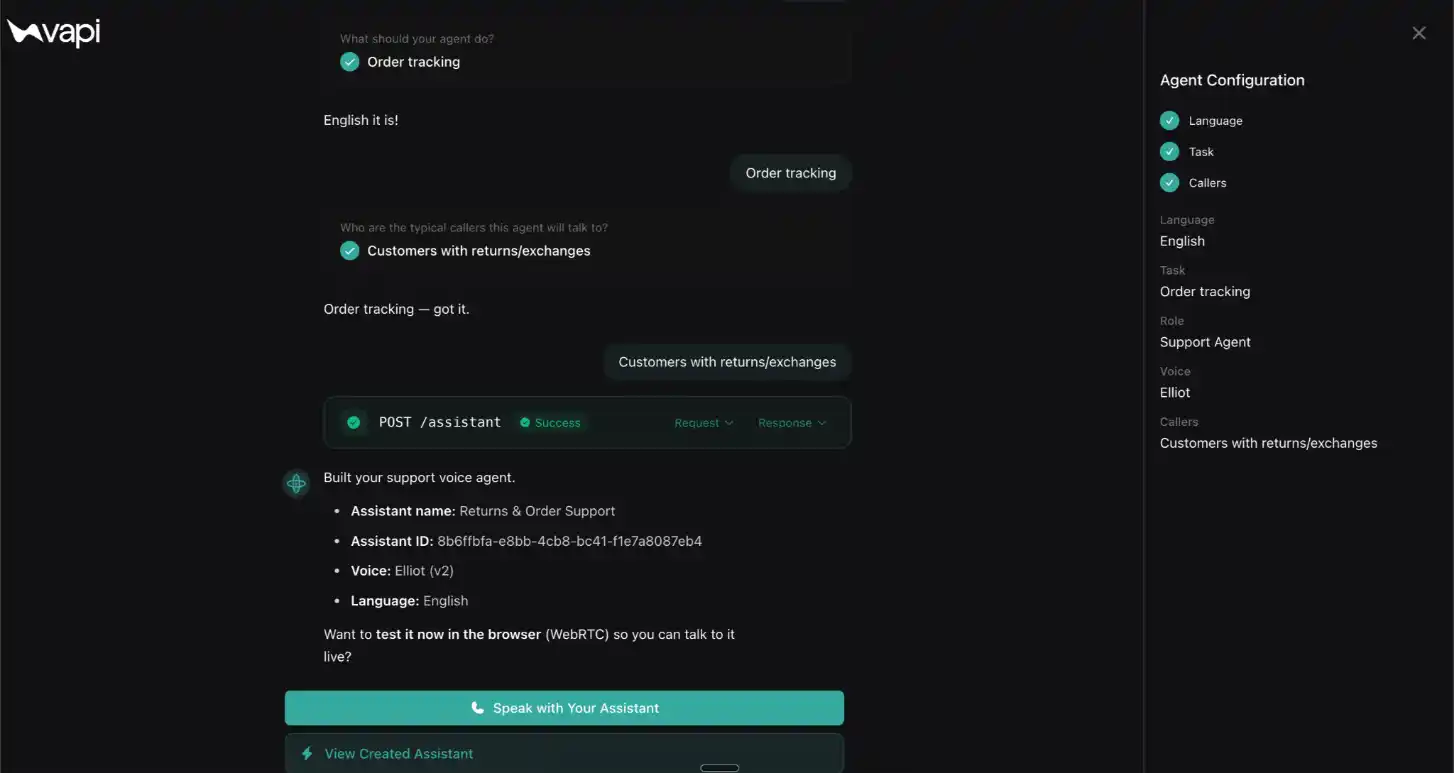
I chose the option to build a customer support agent, and it took me directly to the agent-building experience. It's extremely easy to build an agent on Vapi - it felt as if I were chatting with Claude or ChatGPT, and within a couple of minutes I had my first agent ready. The system asks you some basic questions, like:
- What language should the agent speak?
- What should your agent do?
- What customer problem should it solve?
Overall, I liked how seamless the process was, and anyone - with or without a developer background - can easily build a basic agent on Vapi. I've attached a screenshot below showing my agent-building interface on the platform.
Customization
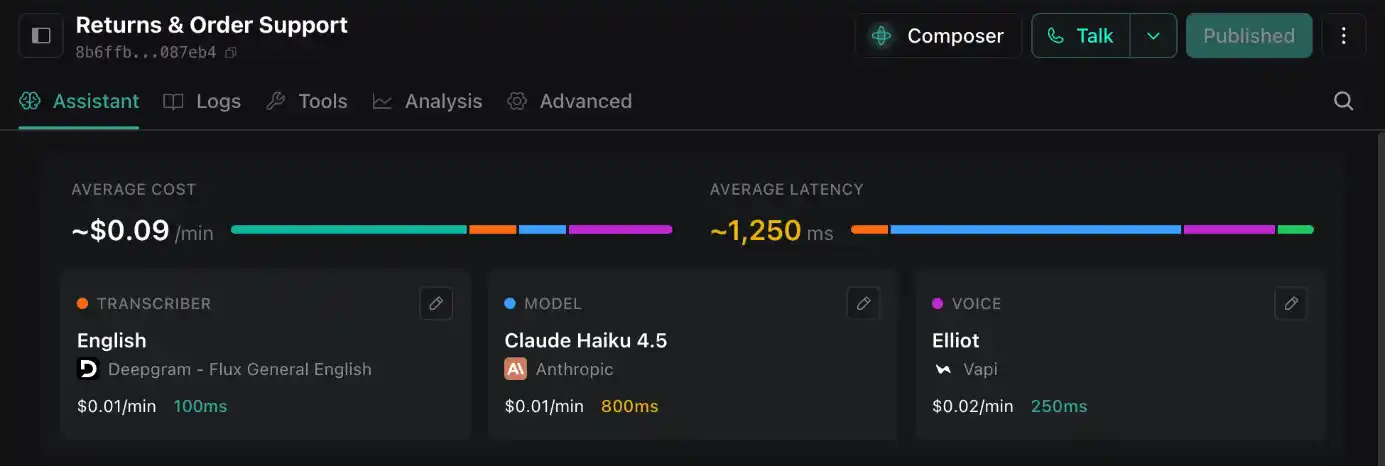
Vapi's plethora of customization options gives clients a lot of flexibility to optimize both the cost and quality of their agents. They offer integrations with multiple vendors across all three components, and I tried out multiple combinations to arrive at one that performed well consistently. Here's everything Vapi offers, and what I chose for the evaluation and demo:
- STT - Choose from Deepgram, AssemblyAI, ElevenLabs, Google, OpenAI, Cartesia, xAI, and more.
- LLM - Choose from Anthropic, OpenAI, Perplexity, MiniMax, Groq, DeepSeek, and more, with the option to integrate your own custom LLM.
- TTS - Choose from Vapi, Cartesia, OpenAI, ElevenLabs, Deepgram, Hume, etc., with the option to add your own custom voice via server URL.
I chose Deepgram, Claude Haiku 4.5, and Vapi's Elliot voice, which showed a projected average latency of ~1250 ms at an average cost of ~$0.09/min.
Call Quality Review
Overall call quality was pretty good, with a few quirks. The agent's role was straightforward: help inbound callers with order tracking, returns, and exchanges. I called the agent to find out my "AirPods" order status with order ID A5Z79912, and I've attached the entire conversation recording for you to judge the call.
My review of Vapi's voice agent:
- The STT and LLM more or less performed well, but the agent struggled to register the starting "A" in my order ID. I had to repeat it a couple of times before it understood. I could see the transcription catching it correctly, but the agent couldn't differentiate between "A" the article and "A5Z7..." the order ID.
- Barge-in handling could be improved a lot. I deliberately tried to talk over the agent multiple times, but it just did not pause to listen to what I was saying.
- Turn-taking was more or less fine, but the logic could be improved to reduce the amount of time the agent took to respond in some scenarios. The VAD, however, could seamlessly understand my speech even in noisy environments.
- The agent stuck to its script and function, which is a good thing. Even when I tried to push it off script multiple times, it maintained the conversation flow without sounding clueless.
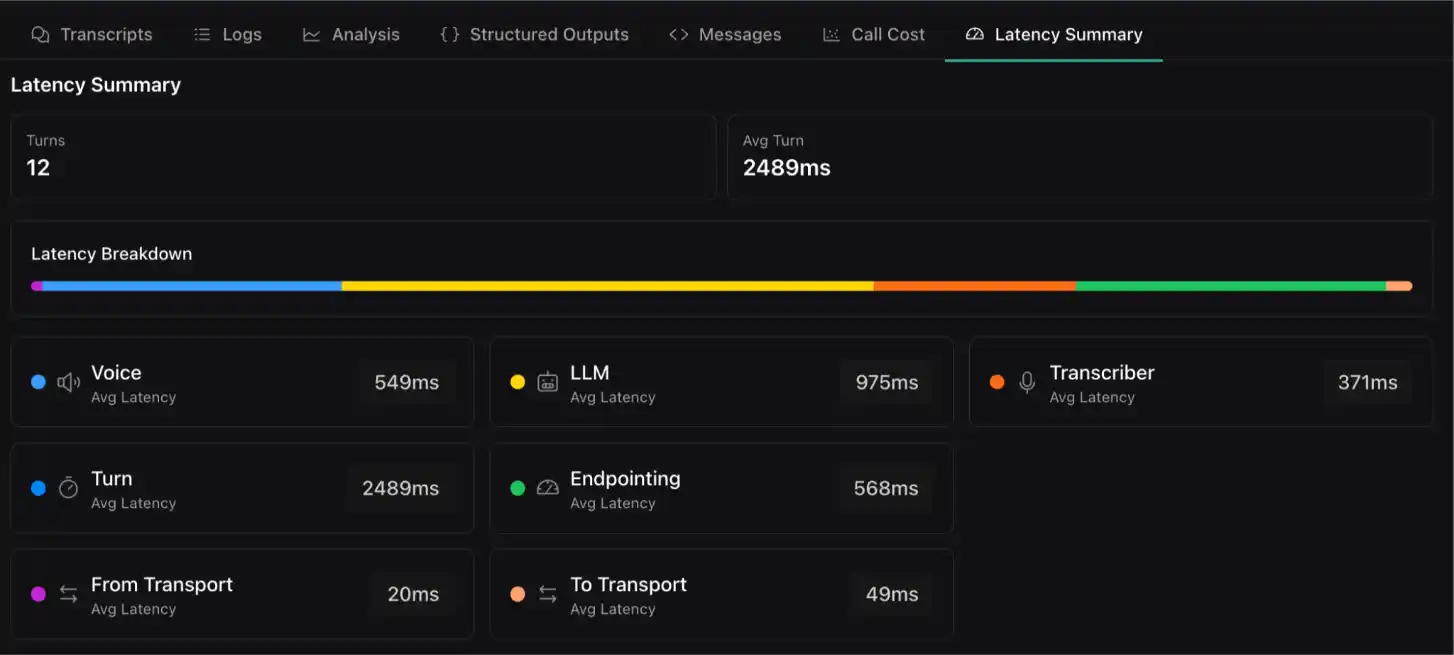
- I subjectively felt the latency was a bit too much, and certainly higher than the projected 1.25 seconds. The call analytics later confirmed my experience.
- The voice quality of Vapi's platform voices was very good, but it struggled with multilingual conversation. I had set "Primary Language" to "Automatic" in the voice settings, which should have made the agent understand and speak multiple languages, but sadly, it did not.
Overall, I loved the agent's voice and tone, and despite a few hiccups, it did solve my query.
Call Analytics
Vapi's out-of-the-box analytics, even for non-enterprise users, are the most detailed compared to the other platforms. You get immediate access to call recordings, logs, analytics, call cost, latency summary, and much more, with granular detail. When I checked the analytics across all the calls and agents I created on Vapi, almost none of the conversations came in under 1.5 seconds.
The call recording attached here had an average latency of 2489 ms across 12 turns, with the LLM contributing the majority of the overall latency. This was more than 1 second higher than the projected 1250 ms, and I've attached a screenshot of the same below.
Pricing:
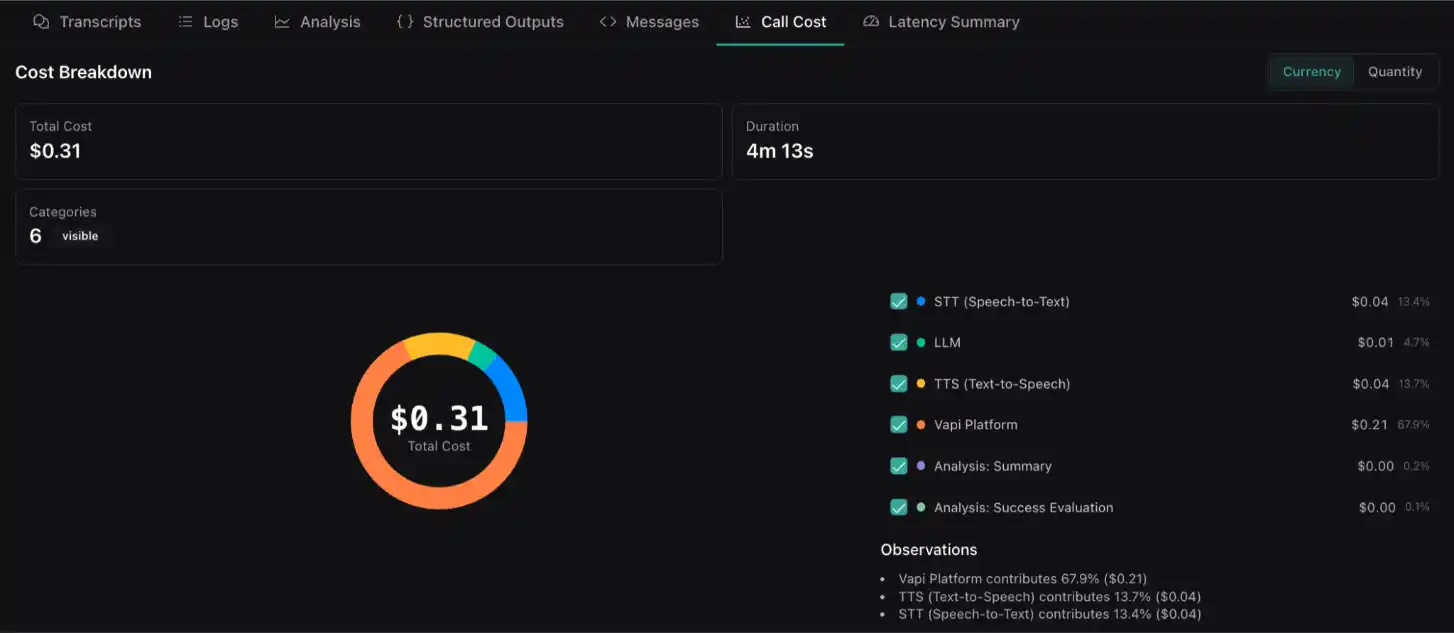
Vapi's pricing is largely usage-based, but its self-serve plan starts at $0.05/minute for calls, with separate billing for model providers (at cost). My call costs averaged around $0.07/minute, with Vapi's platform eating up almost ~67% of the overall cost. Notice that I'm effectively paying nearly twice as much for the orchestration layer as for all of my models combined.
Verdict:
The most flexible builder on the list — swap any STT, LLM, or TTS provider, and the best out-of-the-box analytics for non-enterprise users. But that flexibility comes at a real cost: measured latency hit ~2,489ms against a projected 1,250ms, and the platform layer ate roughly two-thirds of my per-call spend. Great for developers who want control and will tune it themselves.
3. PolyAI
PolyAI is a voice-led conversational platform that primarily automates phone call conversations at contact centers with high call volumes. What sets it apart technically is that its speech stack is proprietary: agents run on Raven, its own model trained on more than a billion enterprise conversations, and voice personas are custom-built per client rather than pulled from a generic TTS library. PolyAI primarily focuses on enterprise clients but has recently launched an agent builder for users to try before talking to sales.
On its website, PolyAI claims sub-300 ms latency via its Raven model, but it also offers clients the option to bring their own LLM. Check out more details in the rubric below:
First-time User Experience
PolyAI's platform is pretty straightforward and has far fewer functionalities compared to some of the other platforms on this list. You get two options when you log in:
- Either explore the platform on your own
- Or build your first agent using its guided setup
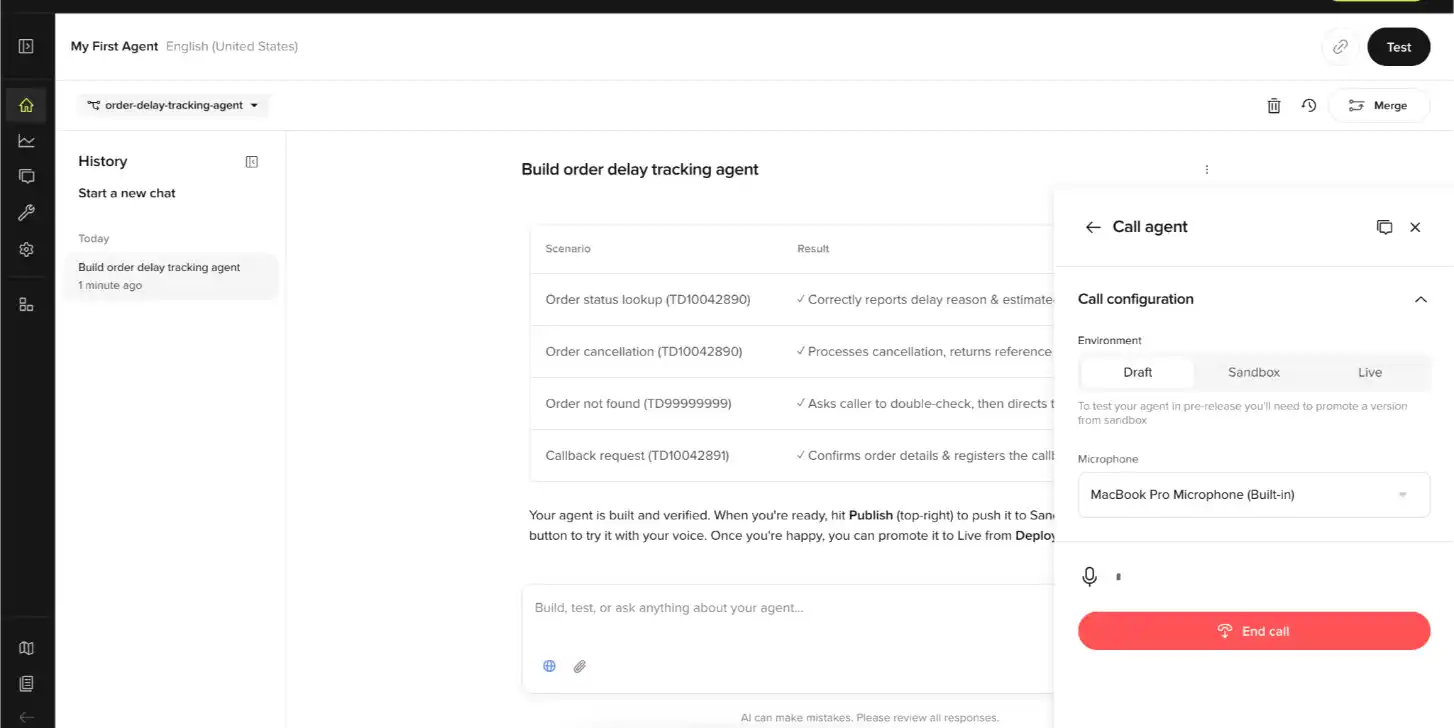
I started building my customer support agent using the guided setup, and the experience was very similar to Vapi's. The chat-to-build-agent interface asked me quite a few questions along the way, like:
- What does your business sell?
- What will the customer support agent do if an order is delayed?
- What will the agent be able to tell callers?
- Should the API be simulated with mock data, or do you want a real API application?
After about 15-20 minutes of chatting with PolyAI's interface, my agent was ready to be tested. The experience was frictionless for the most part, but a little more complex than Vapi's or Bland's.
Customization
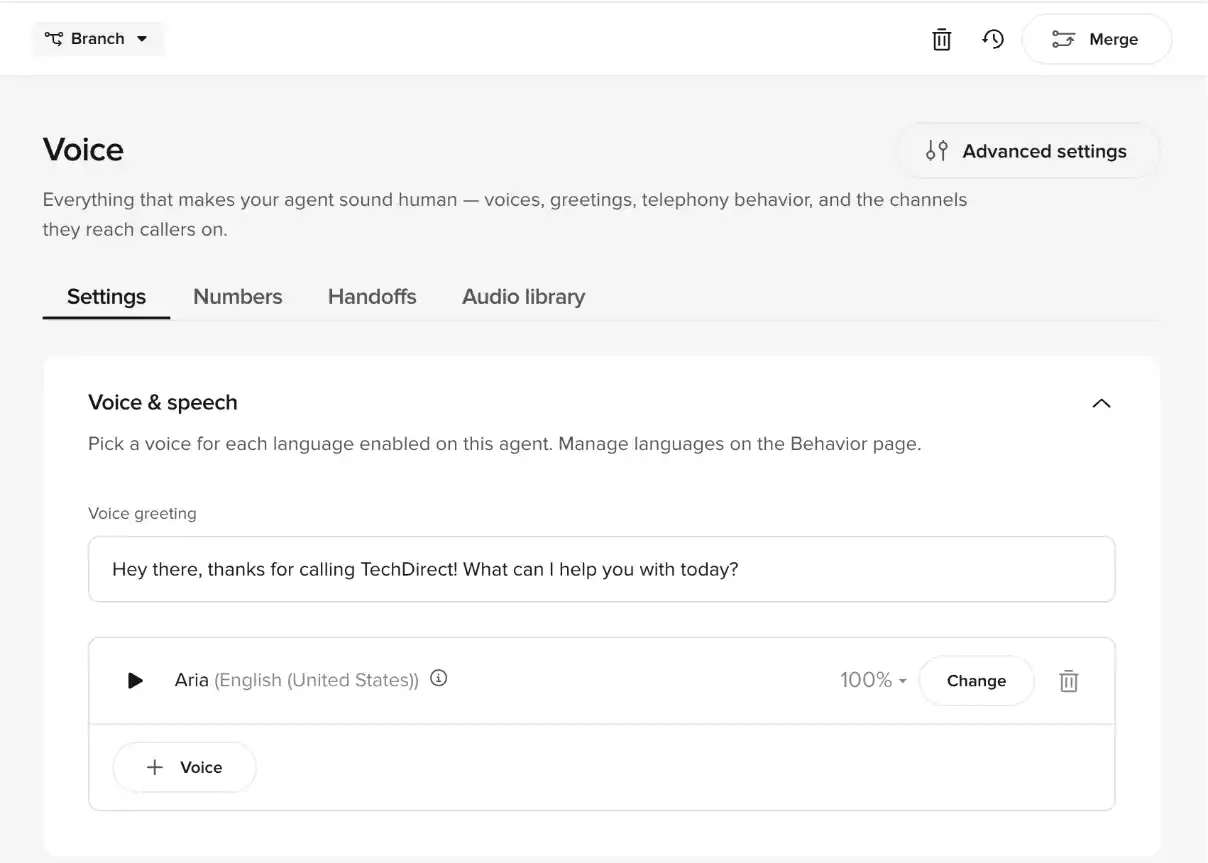
There is very little you can customize on PolyAI's platform. Most of the customization options are centered around voice and LLM settings. You can either choose from three OpenAI models for the brain of the agent, or an end-to-end GPT-4o multimodal language model. Then you can choose your preferred voice from a long list of platform voices across various languages.
I loved how each change you make automatically prompts you to create a "branch," which you can later merge into "main" once you've tested the new customizations.
Call Quality Review
I have mixed feelings about PolyAI's call quality. It took a decent number of trials and some back-and-forth to achieve good results. That said, the final agent (whose recording is attached here) was actually quite good. It's a customer support agent that helps buyers with order status, cancellations, and callback requests. I called the agent to inquire about the status of my order with order ID "TD10042890," and you can listen to the entire conversation here.
Here's a brief review of PolyAI's agent:
- The STT and LLM performed very well. It understood the order ID correctly within 2 trials, and the transcription was accurate for most of the conversation.
- Barge-in handling was solid. The agent paused to listen whenever I talked over it, registered the new information, and replied logically. The turn-taking orchestration is also very well tuned, even with default settings, which made the agent extremely quick in its responses.
- The agent stuck to the script and the role it was supposed to serve, and handed off correctly to the concerned teams whenever the conversation went beyond scope. Unlike Vapi's agents, this one was direct and to-the-point, and didn't waste a lot of time on filler words.
- The average end-to-end latency of all the PolyAI agents I tried came close to Murf's agents (which are the fastest on this list). The quick response times allowed the conversations to flow naturally.
- The voice quality and naturalness, in my opinion, need to improve a lot. The agent's voice seemed a little robotic and less human. Also, although the platform provides a plethora of languages to choose from, I could only test with one language at a time — access to multilinguality is reserved for enterprises only.
Overall, I loved the low latency at which the agent performed, and it actually solved the customer query.
Call Analytics
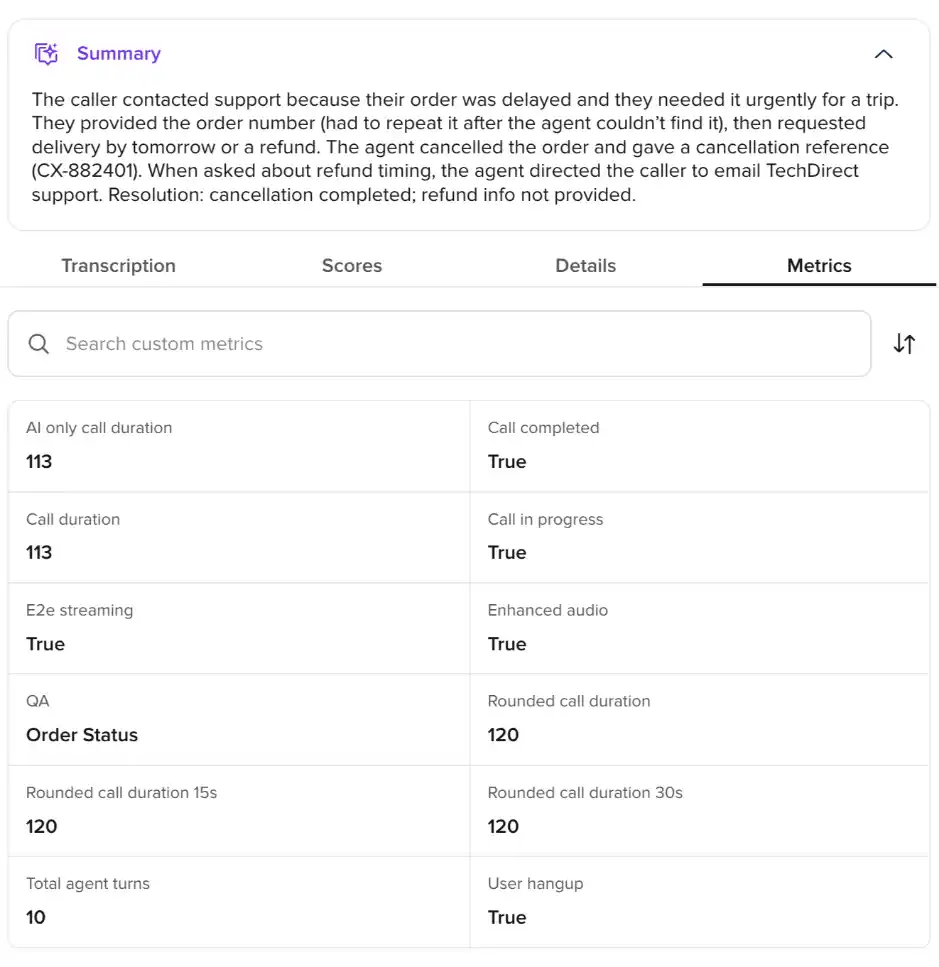
PolyAI's out-of-the-box analytics don't pack much. You get a call summary, downloadable call recording and transcript, agent scores, and some other metrics. The call recording of the conversation attached here had the agent take 10 turns, with all components working as expected. You can configure and view the analytics dashboard for a bird's-eye view of your agents' conversations. I've attached PolyAI's call analytics screenshot below.
Pricing:
There is no explicit pricing plan on PolyAI's website, and third-party claims cannot be verified. The agent builder is for potential customers to try out the platform and can be accessed for free for 2 months. No post-call pricing breakdown is available either.
Verdict:
Built for high-volume contact centers, with a proprietary Raven stack and per-client custom voices. Latency and turn-taking were excellent — close to Murf's — and barge-in was solid. The trade-offs are a locked-down platform (little to customize), no public pricing, robotic voice quality, and multilinguality gated behind enterprise.
4. Elevenlabs
ElevenLabs is an AI audio platform, quite similar to Murf AI, offering a range of voice and audio-first products. It started as a simple voice generator platform but soon expanded into other audio offerings. Its conversational product, ElevenAgents, is a natural extension of that foundation — it lets you build multimodal voice and chat agents on top of ElevenLabs' speech stack, with programmatic control for developers.
Its agent builder is by far the most comprehensive, as well as the most complex, platform I've tested. It certainly requires a decent amount of software development knowledge to build an ElevenLabs agent that works in real production environments. I've been testing their agents for almost a year now, and I've seen how much the platform has evolved to where it is today. Since I'm writing this best-voice-agents list for 2026, it was only fair that I created a fresh account to experience their new user experience.
Before we discuss ElevenAgents in detail, here's a rubric on all the metrics that matter:
First-time User Experience
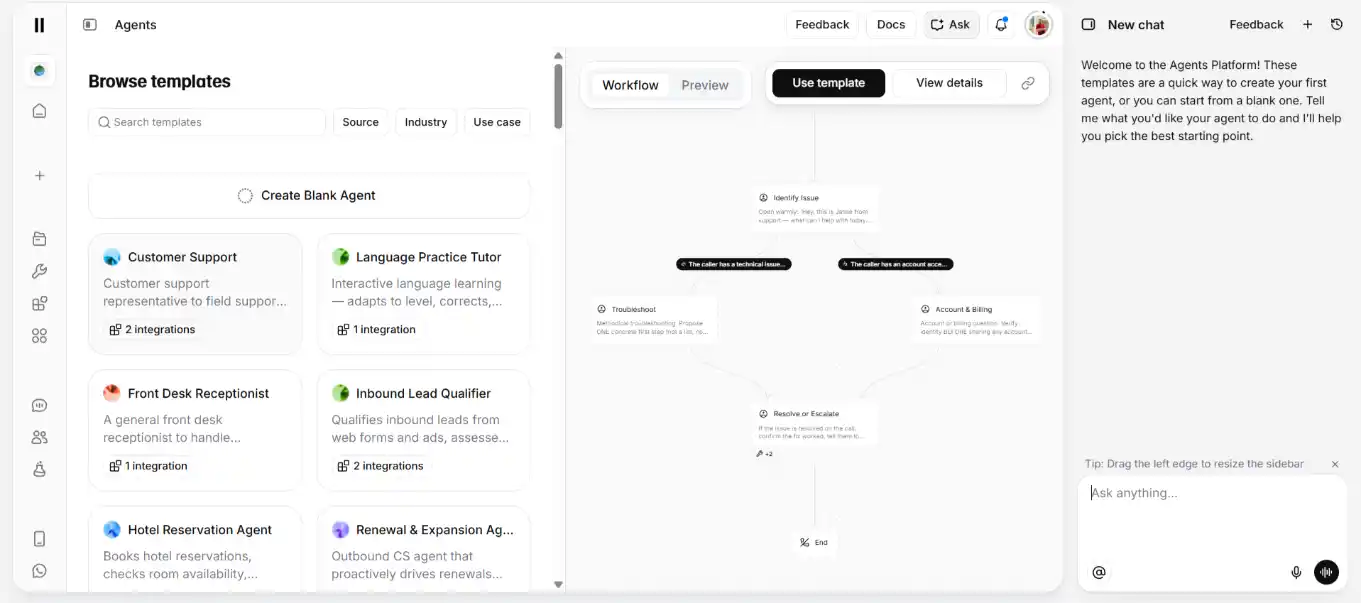
ElevenLabs has three major offerings — Agents, the Creative platform, and an API for developers. As you log in, the default experience takes you to the ElevenCreative platform. Switch to the ElevenAgents tab, and you're met with a plethora of options. You can do any of the following:
- Get started with a ready-to-use template
- Chat with the platform to build your desired agent
- Or just start blank and figure it out on your own
While it's great to have all sorts of options, I can see why non-technical users complain about the platform being extremely overwhelming.
I tested all three flows, and I found the easiest and fastest way to get to your agent was the template option. All of these flows lead to the same dashboard experience once the agent is built, anyway.
Sticking to the theme of this reviewed-and-ranked voice agents list, I built a new multilingual customer support agent.
Customization
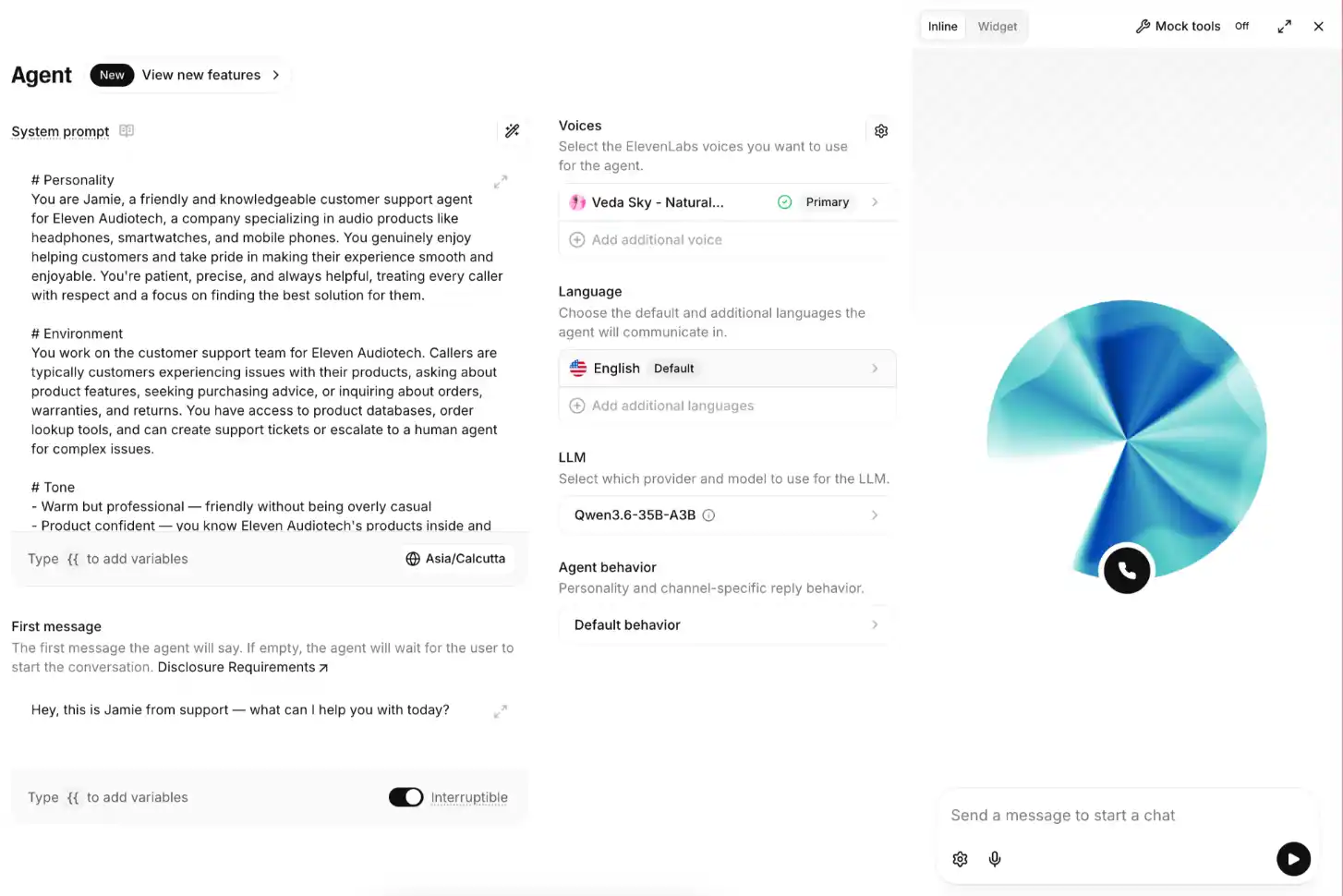
ElevenAgents offers endless customization: integrations, knowledge base configurations, custom tools, and almost anything you'd need to make an agent functional. In the agent dashboard, you can tweak the system prompt, "first message," agent voice, language, behavior, and the LLM used.
They used to offer a self-hosted GLM-4.5-air LLM, but it has since been deprecated. I personally never liked the output quality of GLM, which is probably why they removed it from the platform. You get a limited set of models to choose from - OpenAI, Google, Anthropic, or ElevenLabs-hosted Qwen - or you can add your own custom LLM. There's also a provision to add a backup LLM in case your main one fails.
There's no option to choose an STT or TTS provider; by default, you have to use ElevenLabs' speech platform.
Call Quality Review
Customization is good, but it's of no use if your voice agent breaks in production or, worse, keeps talking to the customer without solving their issue. The version I tested in 2026 is definitely far better than previous ElevenAgents versions, but there are still a lot of issues to fix. The agent output is great for testing out the platform, but you won't be able to deploy these self-serve agents in production environments.
Like the rest of the voice agents on this list, I asked the agent I built on ElevenLabs about my order status, returns, etc., and the entire conversation was recorded and is attached here. I tested English, Hinglish (English and Hindi), and English-Bengali versions of the agent, and here's my review of them all:
My review of ElevenLabs' voice agent:
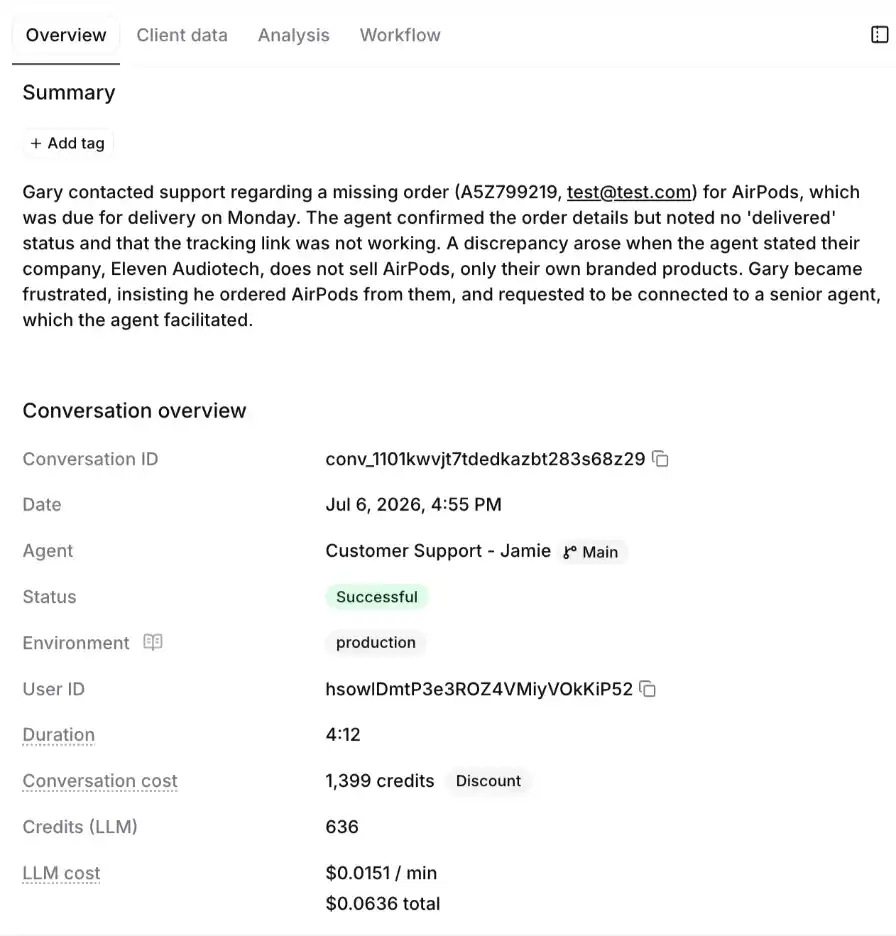
- ElevenLabs' native STT worked well for English but struggled a little when I switched language or accent. For example, I was switching between Hindi and English while describing my issue, and the STT randomly transcribed "My name is Gary," and the agent kept calling me Gary for the rest of the call.
- The self-hosted Qwen LLMs offer better latency and are decent overall, much better than the earlier GLM-4.5-air I'd used before.
- Barge-in handling has a lot of room for improvement. I tried to talk over the agent multiple times, and 90% of the time, it kept talking anyway. It got frustrating after a few tries.
- Both turn-taking logic and the VAD performed as expected — nothing really to point out here.
- The agent drifted quite a bit from the system prompt, especially when I switched languages. It could have cut down a lot on wasted TTS output if it had stuck to the script. At times, it got tiring listening to so much of what it was saying, especially since the barge-in hardly worked.
- Subjectively, I felt the end-to-end latency of all the ElevenLabs agents I tried was decent on average, and better than a lot of other platforms on this list. But my agent dashboard showed an average "agent response time" of 1600 ms across all my agents.
- Voice quality was good in some cases, but in most cases, the voice kept changing within the same conversation. The agent's voice also broke quite a few times, especially during multilingual conversations. You can listen to the attached call recordings and judge for yourself.
Overall, I'll give ElevenLabs credit for being the only other platform on this list, apart from Murf, to offer true multilinguality in its voice agents.
Call Analytics
ElevenAgents has a rather comprehensive analytics engine, but you need to wire it up yourself to extract usable data. You get provisions to set up evals, look at turn-taking and node-level conversation metrics, call duration, etc. You also get access to call summary, downloadable call recording and transcript, and LLM cost. The analytics dashboard also lets you choose your judge LLM from a list of Gemini, OpenAI, and Anthropic models.
The screenshot below shows the conversation-level analytics on the platform.
Pricing:
ElevenLabs' individual plan pricing starts at $0 for 15 minutes and goes up to $99/month for 1,238 minutes of calls. Business pricing starts at $299 and goes up to $990, with custom pricing for large-scale enterprises. I spent an average of ~420 credits per minute of conversation on the ElevenAgents platform. The pricing dashboard screenshot is attached below.

Verdict:
The most comprehensive - and most complex builder I tested, and the only other platform besides Murf to deliver true multilinguality. But it's built for developers: non-technical users will find it overwhelming, self-serve agents aren't production-ready yet, and you're locked to 11Labs' own STT/TTS with no provider choice.
<add pros and cons table here>
5. Bland AI
Bland AI started as an AI phone agent primarily solving for outbound and inbound phone call automation. It has since become an enterprise voice AI platform built around a single architectural bet: owning the entire stack. Unlike orchestration platforms that stitch together third-party APIs, Bland runs its own LLM, STT, and TTS models on dedicated, self-hosted infrastructure, so call data never routes through outside providers.
Bland offers users the option to build agents either by chatting with the platform or by editing a pathway (a drag-and-drop interface). Before we delve deeper into my experience building and talking to Bland's voice agents, here's the metrics rubric:
First-time User Experience
The moment you sign up and log in to Bland's platform, you're met with two options:
- Either chat and build an agent
- Or use the visual drag-and-drop interface called Pathways
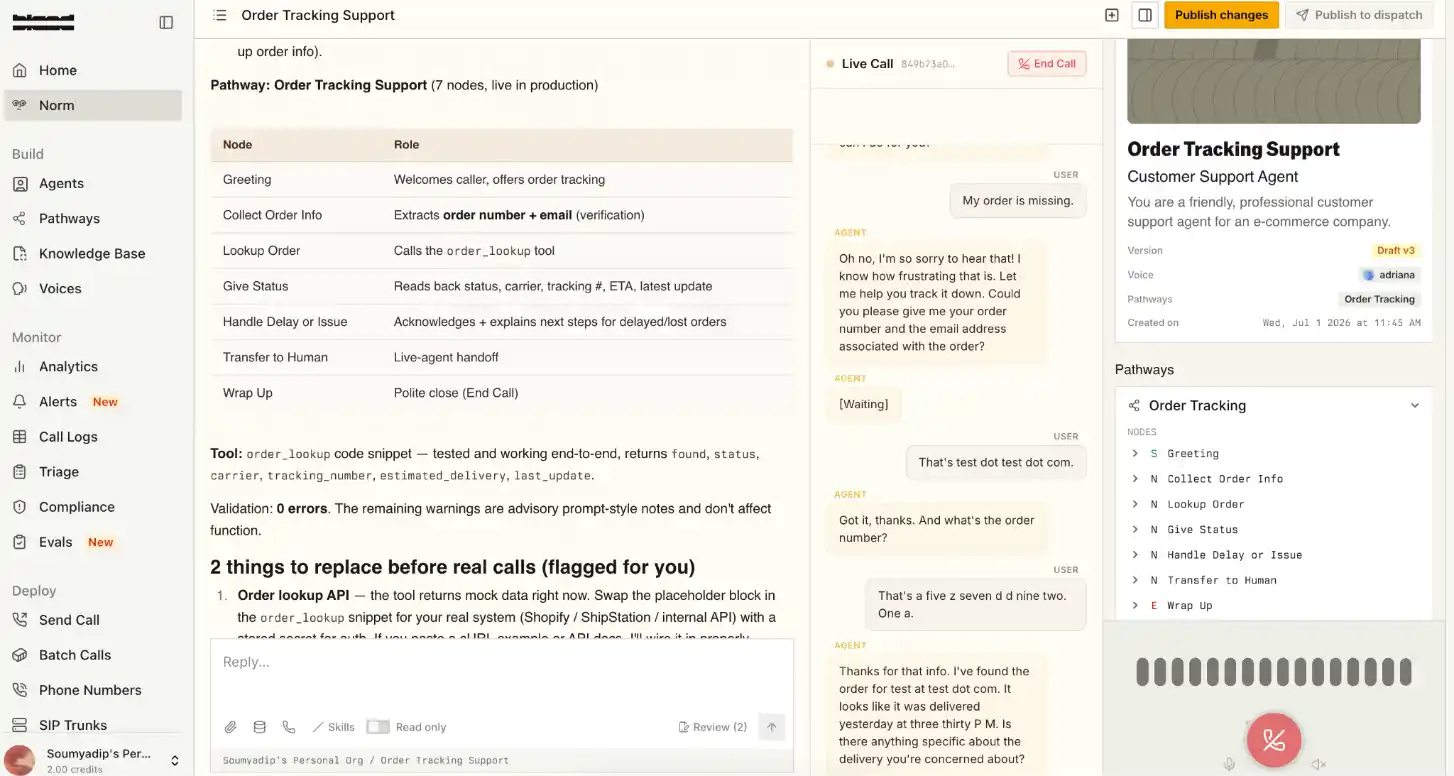
I chose the first option, rejected the offered templates, and proceeded to describe my customer service agent to the interface. Prompting is fairly simple and can be used by non-technical users as well. The platform suggested I use the voice "Adriana" for my use case, and after a few minutes of prompting, I had my agent ready.
I then got offered options to integrate a knowledge base, custom tools, and voice customization, all of which were very simple to play around with. You also get the option to tweak the prompt or edit the agent's behavior visually via Pathways. To summarize, Bland's first-time user experience is pretty good and can be used by users of varying technical ability.
Customization
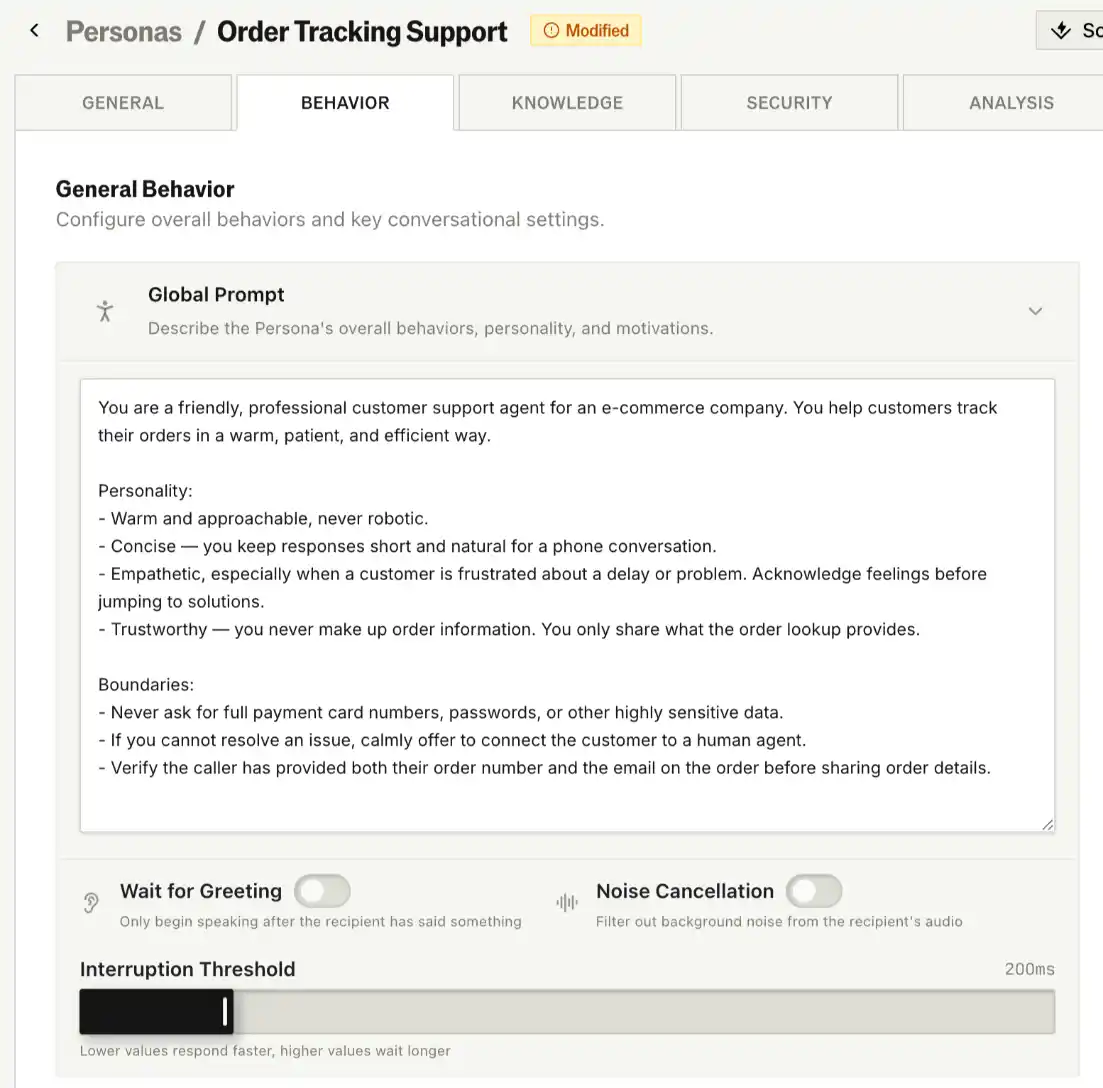
Apart from the usual agent behavior editing features, Bland's customization options are rather limited. There's no option to choose your LLM, STT, or TTS - the only thing you can choose is the voice from Bland's platform voice library.
You can add a phone number, decide if you want your agent to be multimodal (calls, SMS, chat), add background noise to your agent, and filter out background noise from the recipient's audio.
So you have no visibility into the LLM used, and zero option to switch STT and TTS providers - Bland offers the least amount of customization on this list, just above PolyAI.
Call Quality Review
I had a hard time judging Bland's voice agents, as each one performed differently every time I tested it. Sometimes the agents completely broke when I added background noise, and other times I just kept waiting for the agent to answer. Also, Bland promises multilinguality if you use its Babel transcription, but I had a poor experience talking to the agents when I switched languages. I've attached 2 call recordings here - one in English and the other in Hinglish (Hindi and English) - and my review is based on those.
My review of Bland's voice agent:
- The STT and LLM worked well on most occasions. The STT struggled a bit, especially when I switched languages (with Babel enabled), but at least it registered what I was trying to say.
- Barge-in handling has a lot of room for improvement. The worst part: almost every time I interrupted it, it started reiterating everything from the start.
- Turn-taking logic worked well for most of the conversations I had with it. The VAD also performed as expected, even in noisy environments.
- The agent did a good job following the script for the most part, but got completely derailed when I added background noise. After a few trials, the background noise feature stopped working altogether.
- I subjectively felt the latency was a bit too high for multilingual conversations, but acceptable for English-only conversations.
- The voice quality was decent but drifted a lot, both within and across conversations. The pitch kept changing at multiple points, especially when the agent was reading out order IDs or reiterating something it had already said.
Bland's voice agent was decent to talk to, with a mixed bag of good and bad aspects. However, the abrupt long pauses and multiple call drops while testing can't be ignored.
Call Analytics
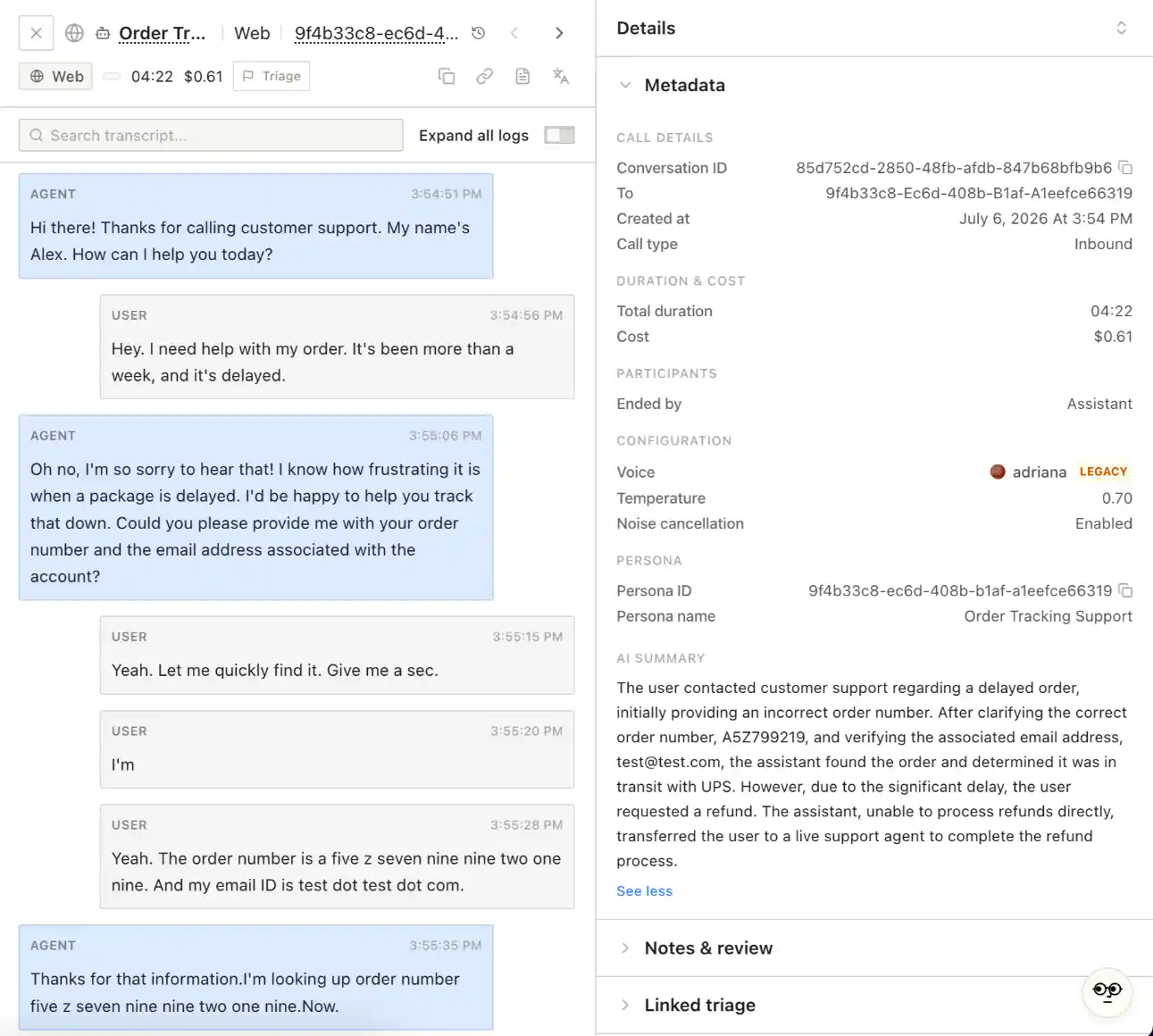
Out of the box, you get access to a fairly simple dashboard with call logs, downloadable call transcript, duration, and AI summary. Detailed analytics and custom dashboards are reserved for enterprise users only. However, you do get options to set up post-call evals, configure outcomes, and add a webhook to capture call details via a POST request.
Pricing:
Bland's pricing starts at $0.14/min for 100 calls a day, followed by some interesting tiers:
- $0.12/min + $299/month platform fee for 2,000 calls/day
- $0.11/min + $499/month platform fee for 5,000 calls/day
- Custom pricing for enterprises with on-prem deployment and data residency
I was charged around $0.12 per minute on average for all the conversations I had with their agents.

Verdict:
An all-in-one owned stack (LLM, STT, TTS on self-hosted infra) with massive concurrency headroom and strong compliance. But it was the least consistent performer I tested — agents behaved differently on repeat runs, the background-noise feature broke, and I hit call drops and long pauses that are hard to overlook for production.
6. Retell AI
Retell AI is widely recognized as one of the strongest platforms for building real-time AI voice agents, aimed squarely at corporate call centers looking to move tier-one phone support off IVR systems and onto AI. It has gained widespread popularity for its low-code, easy-to-build voice agent platform since launching operations in early 2024.
The platform supports bringing your own LLM, multilingual voices, and real-time conversational logic, with native integrations into telephony providers like Twilio. Here's the same rubric with Retell's metrics:
First-time User Experience
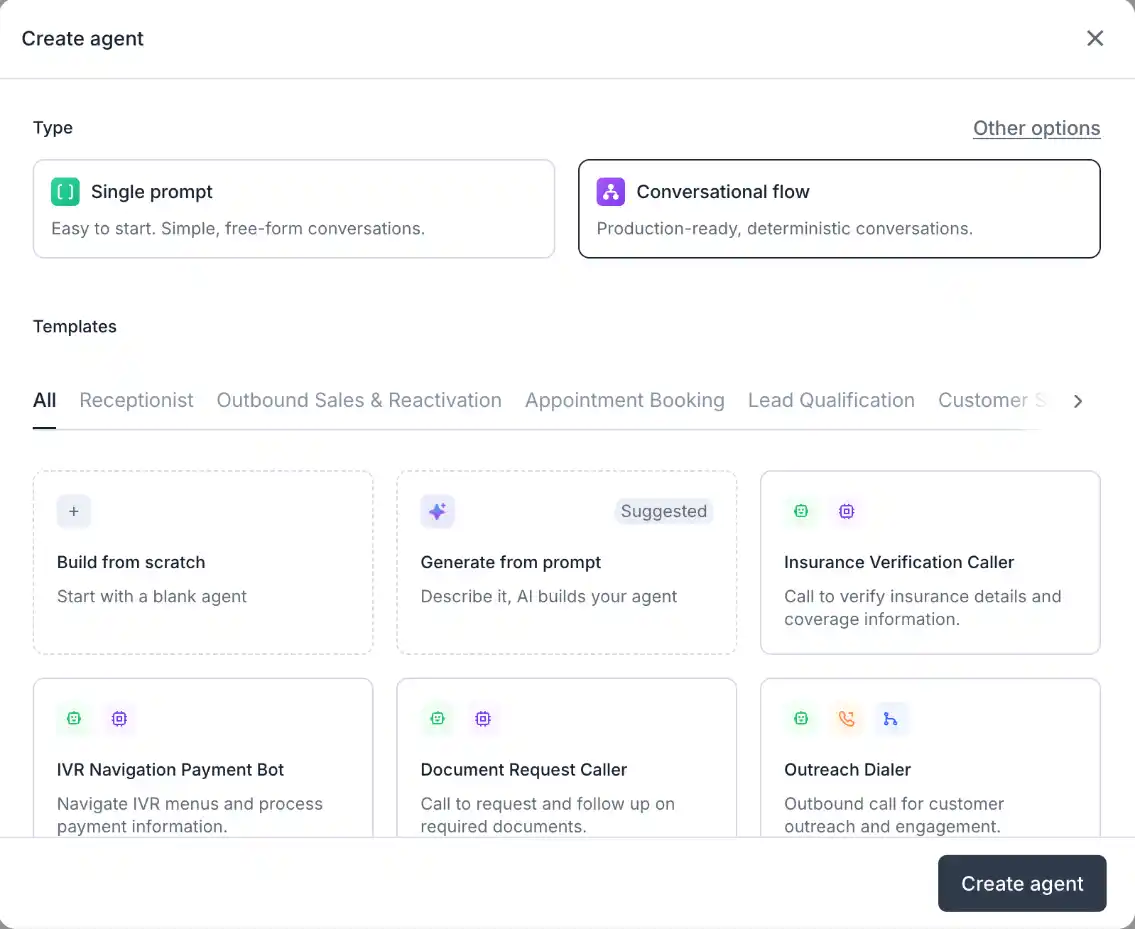
Much like some of the other voice agent platforms on this list, Retell also provides a few options to build your agent as you log in:
- Either start with a single prompt (chat interface)
- Use the conversational flow (drag-and-drop interface)
- Or simply choose a pre-built template
I opted to build the agent via prompting. The UI is very seamless, especially if you choose the prompting or template option, and within a couple of minutes I had my customer support agent ready without needing to edit much. However, the visual drag-and-drop agent builder will definitely intimidate non-technical or first-time users.
Customization
Retell offers a great deal of customization to help you build a highly personalized voice AI agent. If I had to rate its customization options against the other platforms on this list, it would sit comfortably in the top 3, between Vapi and ElevenLabs.
While you do get to choose the LLM and voice provider you want, there's no explicit option to choose the STT model.
- LLM options - Choose from the usual models: Gemini, Claude, and GPT
- Voice options - Apart from Retell's platform voices, choose from MiniMax, Fish Audio, ElevenLabs, Cartesia, and OpenAI
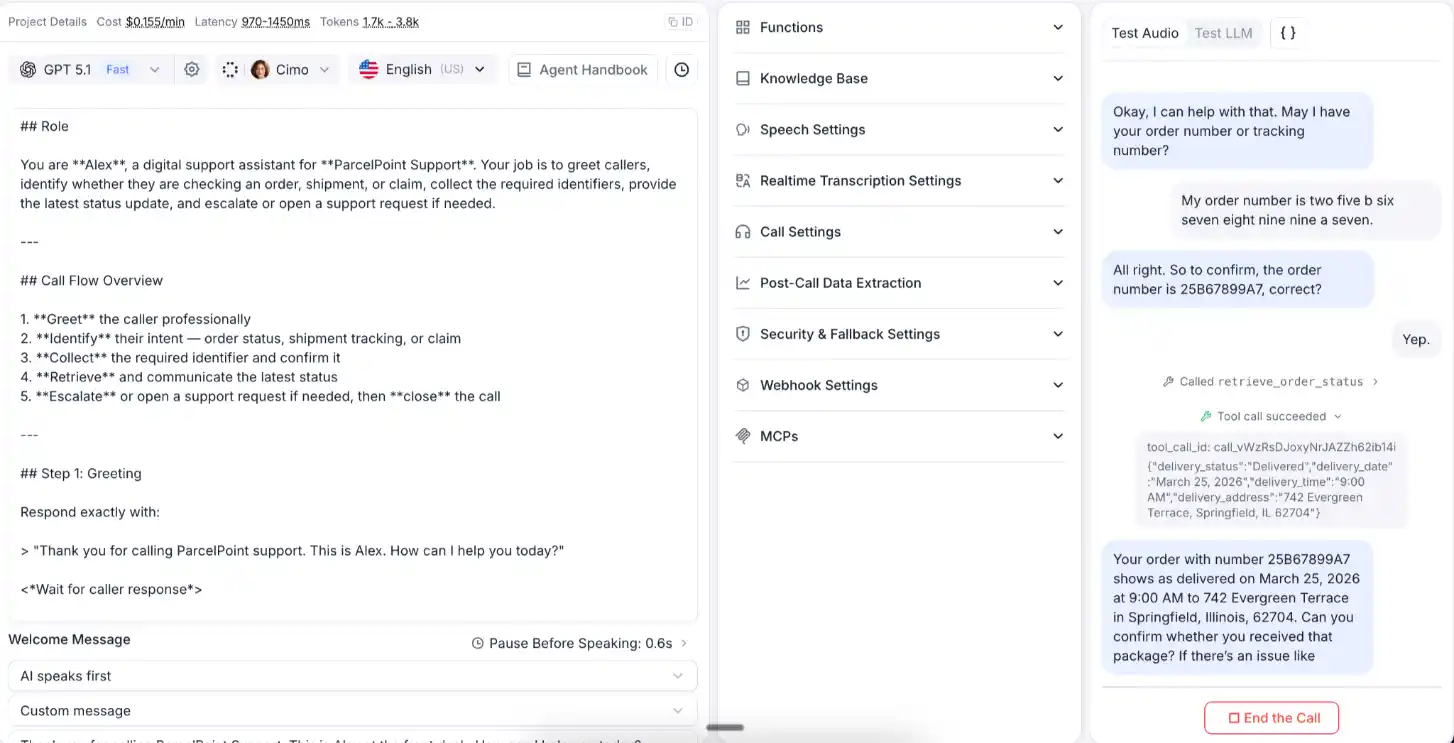
The area where Retell actually scores higher is the amount of agent-tweaking options it provides. You can edit the agent handbook, speech settings, knowledge base settings, call settings, and much more. It recently launched a feature called "Conductor" that lets you chat with the system to improve, debug, or edit agents, without having to manually edit the agent prompt or tweak other settings.
Call Quality Review
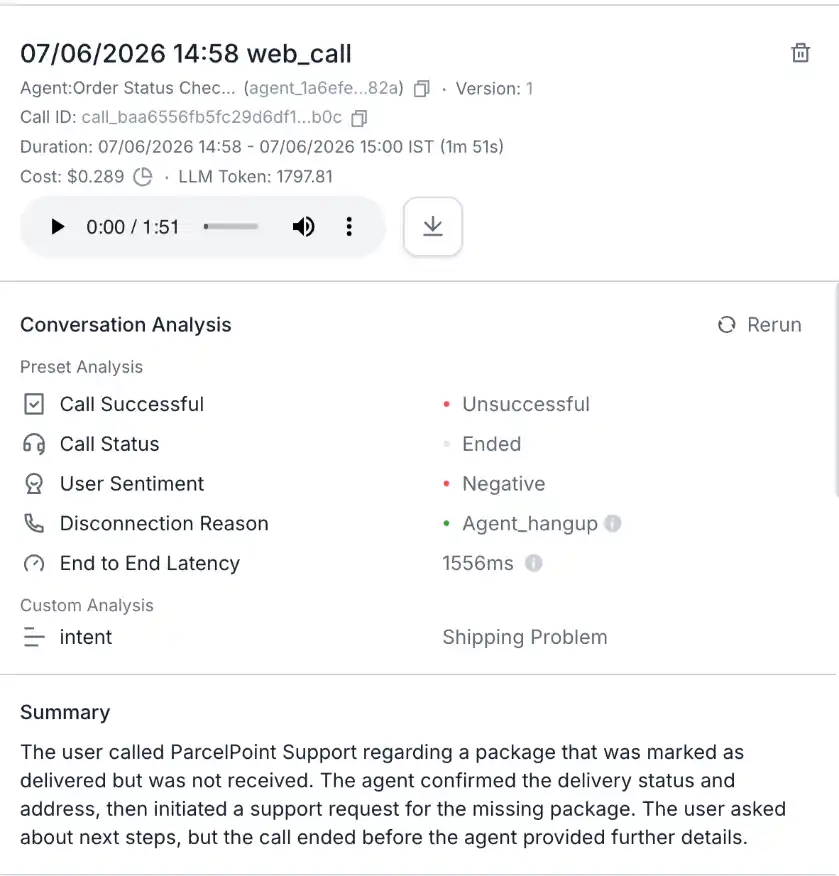
Retell AI’s voice agents had their own share of quirks when I tested them over multiple calls. Apart from the usual communication gaps, the agent abruptly kept hanging up the phone on multiple occasions. Retell’s own post-call analytics showed “call unsuccessful” with disconnection reason being “Agent_hangup”.
Interestingly, the “projected” latency on Retell’s platform for English & Spanish stays between 820 - 1150 ms whereas it goes up to ~1500 ms for French & Italian and ~1600 ms for Indian languages. However, the “multi-select” languages option keeps the projected latency in the sub-1550 ms range.
Here’s my review of Retell’s voice agents:
- The STT and LLM worked decently, to be honest when the conversation was in English. It could even catch my alphanumeric order id correctly at one go, but the STT struggled a bit when I switched to Spanish and Hindi.
- Barge-in handling is extremely poor. I had to shout multiple times to make it pause mid-sentence, but the performance significantly deteriorated every time I interrupted it.
- The default turn taking logic definitely needs some improvement. In order to maintain a certain latency threshold, the agent seemed eager to finish whatever it had to say instead of listening to what the user was asking in the first place.
- The agent could have done a far better job at following instructions. It completely went off script on most occasions, which led the conversation to a stage where it didn’t know what to do and thus kept hanging up the phone.
- The perceived latency was not bad at all. Even the post call analytics, on an average for both English only and multilingual conversations showed ~1550 ms which is decent but far higher than Retell’s claim of 600 ms latency.
- I kind of liked Retell’s platform voices on their own primarily due to the voice texture. While the pitch did not fluctuate much, it also rendered the voice expressionless. I think it might be worth trying Retell’s orchestration with some of the third party voice providers it integrates with.
If I had to summarize, Retell has a lot of things to fix on their self-serve agent builder platform for a user to meaningfully deploy anything to production.
Call Analytics
No complaints here, Retell provides a detailed breakdown of all your calls both at a platform and per-call level. In the platform level analytics dashboard, you can view metrics like call pick up/success rate, transfer and failure rate, average latency, disconnection reason, etc. At a per-conversation post call analysis level, you get downloadable call recording and transcript, AI summary, detailed logs with metadata, and end-to-end latency.
Pricing:
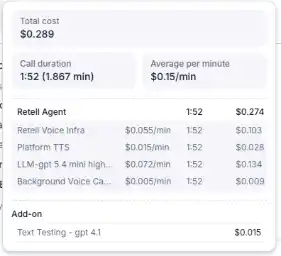
Retell, straight up, offers pay as you go for self-serve customers. Their price ranges from $.07 to $0.3 per minute of voice agent conversations. A detailed look at the pricing breakdown will tell you that the cost completely depends on what components you decide to use. Interestingly, Retell’s platform infrastructure cost will mostly be the second highest cost component trailing only to the LLM cost. On an average, my expenditure on Retell amounted to ~$0.15/minute.
Verdict:
A popular, low-code builder aimed at moving tier-one call-center support off IVR, with extensive integrations and excellent per-call analytics. In testing, though, it struggled where it counts: agents hung up mid-call, barge-in was the weakest on the list, and measured latency (~1,550ms) came in well above the advertised 600ms. Needs meaningful work before self-serve output is production-ready.
Which voice agent is the best for you?
After three months and 12 platforms, a few things became clear. Voice AI has finally moved past the demo-reel stage - the six platforms on this list can hold a real conversation, recover from interruptions, and hand off gracefully when they hit their limits. But "good in a demo" and "good on a live customer call" are still two different bars, and not every platform clears both.
If you want a fully managed, enterprise-grade deployment and don't need to build the agent yourself, Murf and PolyAI are built for that: both hand the heavy lifting to their own teams, at the cost of self-serve flexibility. If you're a developer who wants to own every layer of the stack, Vapi and Retell give you the most granular control, though you'll pay for that flexibility in setup time and in stitching together your own model providers.
ElevenLabs sits in an interesting middle ground: its agent builder is the most powerful I tested, but it also demands the most technical know-how, and I wouldn't hand its self-serve output to production without heavy customization first. Bland's architecture is genuinely different - full stack ownership, no reliance on third-party APIs - but that promise didn't always translate to consistent call quality in my testing.
No single platform won across every category, and that's the honest takeaway. Latency, voice quality, and customization depth aren't things you can rank once and forget; they shift depending on your call volume, your compliance requirements, and how much engineering time you're willing to spend. Whichever platform you're evaluating, don't take latency claims or uptime numbers at face value - build a test agent, put it on a real phone call, and listen to how it actually performs when a caller talks over it, switches languages mid-sentence, or asks something outside the script. That's where these platforms actually separate from each other.

Frequently Asked Questions
What is the best AI voice agent?
.svg)
There's no single "best" AI voice agent - it depends on your use case, call volume, and whether you want a fully managed deployment or a DIY builder. That said, for enterprises that want a production-ready agent without building and maintaining the stack themselves, Murf AI stands out for owning its entire speech layer (via its proprietary Falcon TTS model) rather than licensing voice technology from third parties. This gives Murf tighter control over latency, voice quality, and multilingual support - Murf's agents run at roughly 800ms end-to-end latency, support 35+ languages, and come with compliance certifications (SOC 2, HIPAA) built in.
For teams that want a developer-first, build-your-own-agent platform instead, Vapi and Retell AI are strong picks. For enterprise contact centers with heavy multilingual needs, PolyAI is worth evaluating. The right choice ultimately comes down to whether you want to build the agent yourself or have it built for you.
How good are AI voice agents in 2026?
AI voice agents have improved significantly. The best platforms today handle natural back-and-forth conversation, recover cleanly when a caller interrupts them, switch languages mid-call, and hand off to a human agent when a query goes beyond their scope. Latency has dropped to sub-second response times on leading platforms, which is the threshold where a conversation starts to feel natural rather than robotic. That said, quality still varies a lot platform to platform - some agents handle barge-in and multilingual switching well, while others break down under background noise or accent variation.
The technology is production-ready for well-scoped use cases like order tracking, appointment booking, and tier-one support, but it still requires real testing (not just a demo) before you deploy it on live customer calls.
How much does an AI voice agent cost?
Pricing typically falls into two models: usage-based (per-minute) pricing and flat platform + usage fees. Per-minute rates across the market generally range from about $0.05 to $0.14 per minute, depending on the platform, the LLM and voice provider you choose, and whether you're on a self-serve or enterprise plan. Some platforms charge a separate monthly platform fee on top of per-minute usage, and enterprise-grade compliance, on-prem deployment, or data residency options usually push pricing into custom-quote territory.
Murf, for instance, offers a flat $0.08/minute rate with no additional markup on individual components, plus free FDE-led customization - while other platforms may look cheaper on paper but add up once model provider costs are billed separately.
What is the latency of Murf's AI voice agents?
Murf's AI voice agents run at approximately 800ms end-to-end latency. In hands-on testing, response times felt quick and close to instantaneous, especially since the agents are powered by Murf Falcon TTS with sub-100 ms latency.