

LiveKit & Murf
Murf is available as a plugin for LiveKit Agents, a framework for building voice and multimodal conversational AI applications. Install the livekit-murf plugin to use Murf for both ends of the agent loop: Finch for speech-to-text and Falcon 2.1 for text-to-speech, with real-time streaming on each. Build voice agents covers the full agent loop and where latency comes from.
Murf AI plugin
The Murf plugin integrates Murf’s speech-to-text and text-to-speech capabilities with LiveKit Agents. Use murf.STT and murf.TTS inside an AgentSession to transcribe the caller and reply in a natural-sounding voice, both on one Murf API key.
Installation
Install the Murf plugin from PyPI:
Using pip
Using uv
This pulls in a compatible livekit-agents release (1.5.2 or later).
Don’t install livekit-murf and livekit-plugins-murf in the same environment. Both provide livekit.plugins.murf, and the one installed later replaces the other. livekit-plugins-murf is TTS-only, so use livekit-murf when you want Murf speech-to-text.
For Existing LiveKit Projects
If you already have a LiveKit project, you can quickly integrate Murf by initializing the murf.STT() and murf.TTS() classes in your existing AgentSession. Both read the same Murf API key from your environment variables. You can get your Murf API key from the Murf API Dashboard:
View all configuration parameters →
Guide to Building Voice Agents with Murf and LiveKit
This guide provides setup instructions and examples for building your first LiveKit Agent with Murf STT and TTS.
Setup & Requirements
Before running the examples above, ensure you have everything configured properly:
Requirements
- Python >= 3.10
- livekit-murf >= 0.2.1 (livekit-agents >= 1.5.2)
Required Packages
The examples in this guide use Murf for speech-to-text and text-to-speech, along with LiveKit plugins for language models (OpenAI) and voice activity detection (Silero). Install all packages used in the examples:
API Keys
You’ll need API keys for the services used in your LiveKit Agent:
- Murf API Key: Sign up at the Murf API Dashboard and generate your API key. The same key covers both STT and TTS.
- LiveKit API Credentials: Get your LiveKit server URL, API key, and secret from LiveKit Cloud.
- Additional Services: Depending on your setup, you may need an API key for your LLM (e.g., OpenAI) service
Environment Variables
To keep your API keys secure, it’s recommended to use environment variables. Create a .env file in your project root:
Then load these variables in your Python code using python-dotenv:
Quick Start Example
Here’s a simple example of how to create a LiveKit Agent Worker with Murf STT and TTS. It uses Finch-Indic to transcribe a caller speaking Hindi or English (India), and the Pooja voice to reply:
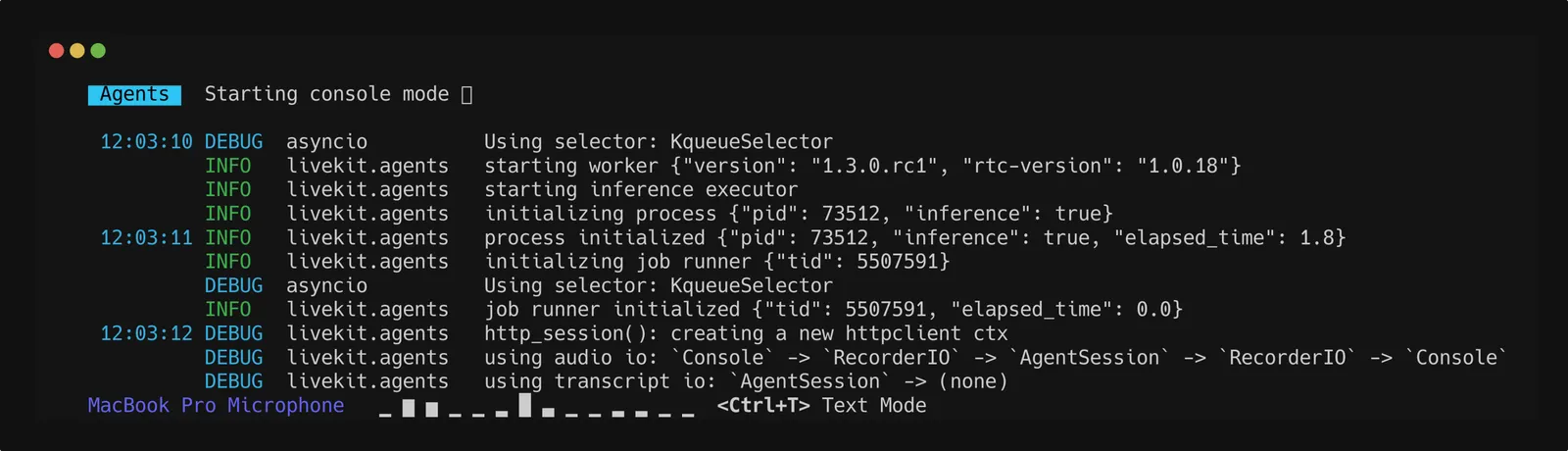
Save this code as agent.py and run it with:
This will start the agent in console where you can directly speak with the agent in the terminal and hear responses in Murf’s natural voice.
Configuration
The murf.STT and murf.TTS classes provide extensive configuration options to customize transcription and voice output according to your needs.
TTS Parameters Reference
STT Parameters Reference
murf.STT streams the caller’s audio to Murf’s Speech to Text WebSocket. Partials arrive while the caller is still speaking, and a final transcript arrives when they pause.
Each Finch version is served on its own host and transcribes only its own languages. finch_indic_1.0 runs on in.api.murf.ai and covers 11 Indian languages plus English (India); finch_global_1.0 runs on us-east.api.murf.ai and covers English and six European languages. The Speech to Text overview lists both language sets.
Complete Example with Custom Configuration
Here’s a more advanced example showing how to customize the Murf STT and TTS configuration with metrics and error handling. It boosts the terms a support caller is likely to use, and formats numbers in the transcript:
💡 Try it out: For complete working examples and deployment guides, see the
livekit-murfrepository.
Features
The Murf integration for LiveKit Agents provides a comprehensive set of features for building voice applications:
- High-Quality Voice Generation: Leverage Murf’s advanced TTS technology with access to over 150 voices across 35+ languages
- Real-time Transcription: Stream the caller’s audio to Finch for interim and final transcripts, with word-level timestamps and keyword boosting
- Real-time Streaming: WebSocket-based streaming for low-latency audio generation, perfect for interactive conversations
- Voice Customization: Control voice style, rate and pitch to match your application’s needs
- Multi-Language Support: Multiple languages and locales with native speaker quality
- Agent Framework Integration: Seamless integration with LiveKit’s Agent framework for building conversational AI
- Flexible Configuration: Comprehensive audio format and quality options including sample rate, channel type, and output formats
Available Voices
Support
If you encounter any issues or have questions:
- Murf API: Documentation · support@murf.ai
- Murf plugin: Source and parameter reference · Issues · PyPI
- LiveKit TTS-only plugin: Plugin guide · Plugin reference · Source