

On-premise deployment
Running Murf in your own infrastructure gives you full control over your voice data, which matters for regulated industries and sensitive use cases where data governance is critical. Your text, audio and transcripts stay inside your network or your cloud account.
Two models are available for on-premise deployment: Falcon 2.1 for text to speech and Finch for speech to text. Gen 2 is hosted-only.
Choose a route
The first decision is whether you want to deploy it yourself or have Murf license it.
A Murf-licensed deployment gives you complete in-house management, sub-100 ms latency, and configurations tailored to your environment.
Deployment Options
Option 1 covers both models. Options 2 and 3 cover Falcon 2.1 text to speech; talk to the team about Finch in other environments.
Option 1 – AWS Marketplace (self-serve)
Subscribe on AWS Marketplace and deploy the model as an Amazon SageMaker endpoint in your own AWS account. You need an AWS account only: no Murf API key and no separate license step. Your data stays in your account, and AWS bills you.
Option 2 – Private Data Center (On-Prem Hardware)
Run Falcon 2.1 on your own physical servers for maximum control and predictable performance. This option is ideal for high-volume workloads and teams with in-house IT and operations expertise. With this setup, your IT team manages dedicated compute and storage resources, ensuring optimal performance and security. This approach allows for predictable capacity planning and delivers long-term cost efficiency through consistent infrastructure utilization.
Option 3 – Private Cloud (Your VPC)
Deploy Falcon 2.1 within your own isolated Virtual Private Cloud (VPC) on major cloud providers such as AWS, Azure, GCP, or OCI. This configuration ensures that your data remains entirely within your account, as you retain full control over encryption keys, network access, and identity management. It also enables flexible autoscaling and supports multi-Availability Zone deployment patterns for resilience and performance. If your organization uses a different cloud provider, the Murf team can tailor the deployment to suit your specific environment and requirements.
Quickstart (Murf-licensed deployment)
The steps below are for a Falcon 2.1 deployment Murf licenses on your own server. Contact the Murf team to activate that license before you start. On AWS, you can subscribe yourself instead and follow Falcon 2.1 on AWS Marketplace.
This guide walks you through setting up your own Murf Falcon 2.1 On-Prem deployment using an AWS server. The on-prem deployment includes two core components:
- Murf Local License Agent (LLA) – An on-premises licensing proxy that enables secure, high-performance text-to-speech generation within your network.
- Murf TTS Server – The core engine that generates speech from text, optimized for fast response times and easy scaling.
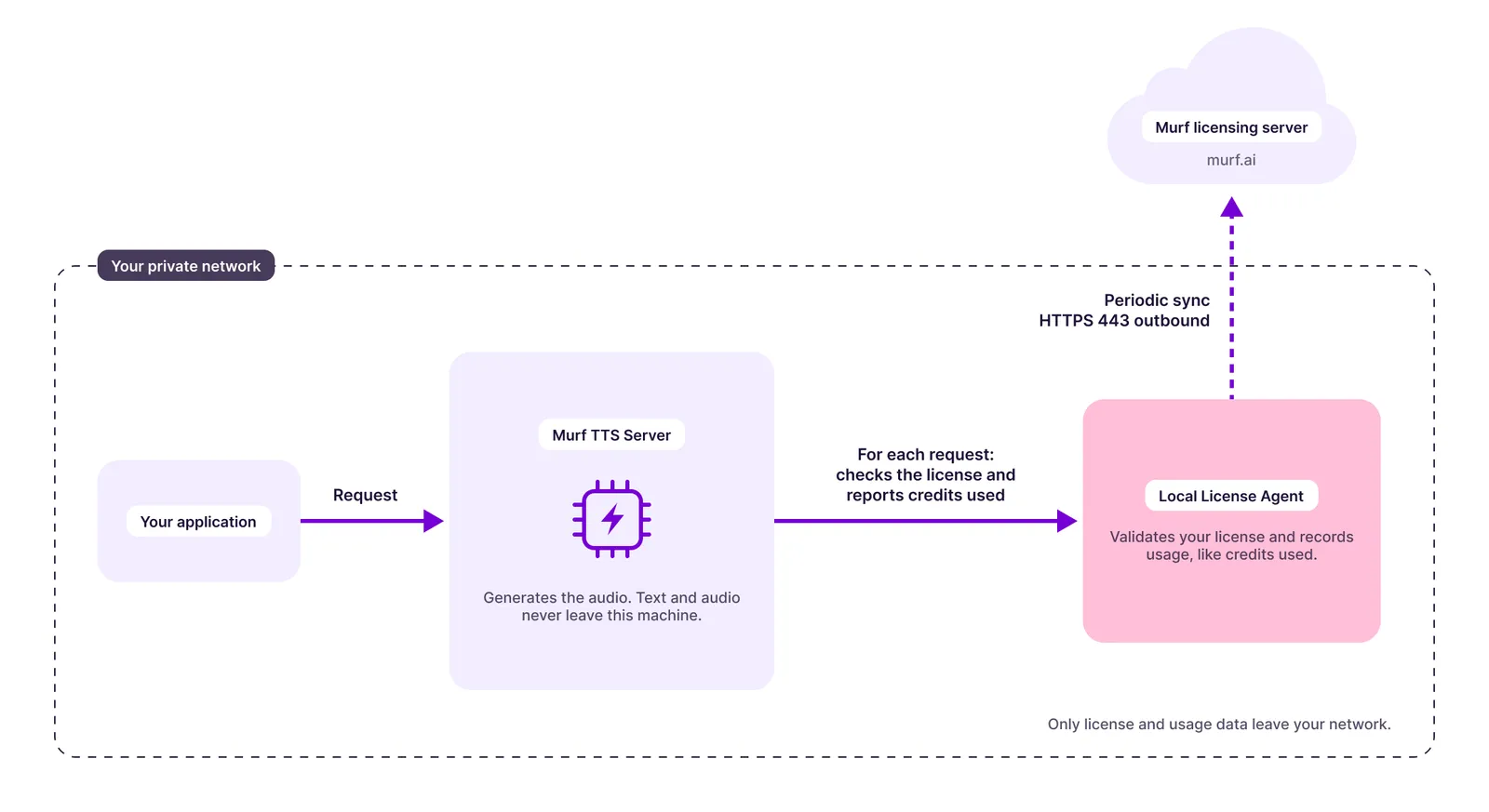
Get started with the Murf Local License Agent in under 60 minutes on a single machine:
Engage with the Murf Team
To begin, contact us to activate your on-prem license and receive access to deployment assets.
A dedicated Murf representative will:
- Set up your enterprise account
- Share container access credentials
- Guide you through POC, scaling, and production deployment
- Provide ongoing support, updates, and customization options
Support
Got questions? Our team is here to help.